

4.17 - Recursive Searching and Sorting
Recursion can be used to traverse strings, arrays, and
ArrayLists.The idea: handle one character or element yourself, then make a recursive call on the rest. A parameter (a shorter
String, or an index) keeps track of where you are, the same way an index does in a loop.// String: reverse("cat") returns "tac" public String reverse(String str) { if (str.length() <= 1) { return str; // base case } return reverse(str.substring(1)) + str.substring(0, 1); } // array: sum(arr, 0) adds up every element public int sum(int[] arr, int index) { if (index == arr.length) { return 0; // base case: past the end } return arr[index] + sum(arr, index + 1); } // ArrayList: count(list, 0) counts how many elements equal "yes" public int count(ArrayList<String> list, int index) { if (index == list.size()) { return 0; // base case: past the end } int rest = count(list, index + 1); if (list.get(index).equals("yes")) { return 1 + rest; } return rest; }
Tracing
reverse("cat"): it returns reverse("at") + "c". That call returns reverse("t") + "a", and reverse("t") hits the base case and returns "t". Working back up, "t" + "a" is "ta", and "ta" + "c" is "tac". In the same way, sum on {3, 5, 2} works out to 3 + (5 + (2 + 0)) = 10.Binary Search
Binary search only works on data that’s already sorted. It starts by checking the middle element, and depending on whether the target is bigger or smaller, it eliminates half of the remaining data with each step, repeating until it finds the value or runs out of elements to check.
// Tracing example: binary search on a sorted array
int[] sorted = {1, 3, 5, 7, 9, 11, 13};
int target = 7;

int low = 0;
int high = sorted.length - 1;

while (low <= high) {
    int mid = (low + high) / 2;
    if (sorted[mid] == target) {
        System.out.println("Found at index " + mid);
        break;
    } else if (sorted[mid] < target) {
        low = mid + 1;
    } else {
        high = mid - 1;
    }
}
Tracing the same code on
sorted = {1, 3, 5, 7, 9, 11, 13}, searching for 11:Step | low | high | mid | sorted[mid] | What happens |
1 | 0 | 6 | 3 | 7 | 7 < 11, so low = 4 |
2 | 4 | 6 | 5 | 11 | Found at index 5 |
Searching for 4, which isn’t in the array:
Step | low | high | mid | sorted[mid] | What happens |
1 | 0 | 6 | 3 | 7 | 7 > 4, so high = 2 |
2 | 0 | 2 | 1 | 3 | 3 < 4, so low = 2 |
3 | 2 | 2 | 2 | 5 | 5 > 4, so high = 1 |
4 | 2 | 1 | low > high, so the loop ends: not found |
mid uses integer division, so (4 + 6) / 2 is 5, and something like (0 + 3) / 2 is 1, not 1.5.Binary search is typically much more efficient than linear search, since it cuts the search space in half every step instead of checking one element at a time.
To see the difference, take a sorted array of 1,000 elements. Linear search might need all 1,000 comparisons, but binary search needs at most 10, since each comparison cuts what’s left about in half: 1,000, 500, 250, 125, 62, 31, 15, 7, 3, 1. Linear search can still win sometimes (like when the target is the very first element), which is why binary search is typically more efficient, not always. And binary search only works on sorted data, while linear search works on anything.
Binary search can be written either iteratively (like above) or recursively.
Here’s the recursive version. It does exactly the same steps as the loop: the
low and high parameters do the job the loop variables did, and each recursive call throws away half of what’s left.public int binarySearch(int[] arr, int target, int low, int high) { if (low > high) { return -1; // base case: nothing left to check, not found } int mid = (low + high) / 2; if (arr[mid] == target) { return mid; // base case: found it } else if (arr[mid] < target) { return binarySearch(arr, target, mid + 1, high); // search the right half } else { return binarySearch(arr, target, low, mid - 1); // search the left half } } // binarySearch(sorted, 11, 0, sorted.length - 1) returns 5
Merge Sort
Merge sort is a recursive sorting algorithm. It keeps splitting the array into smaller and smaller subarrays until each one has just a single element, then it recursively merges those subarrays back together in sorted order until the whole array is sorted.
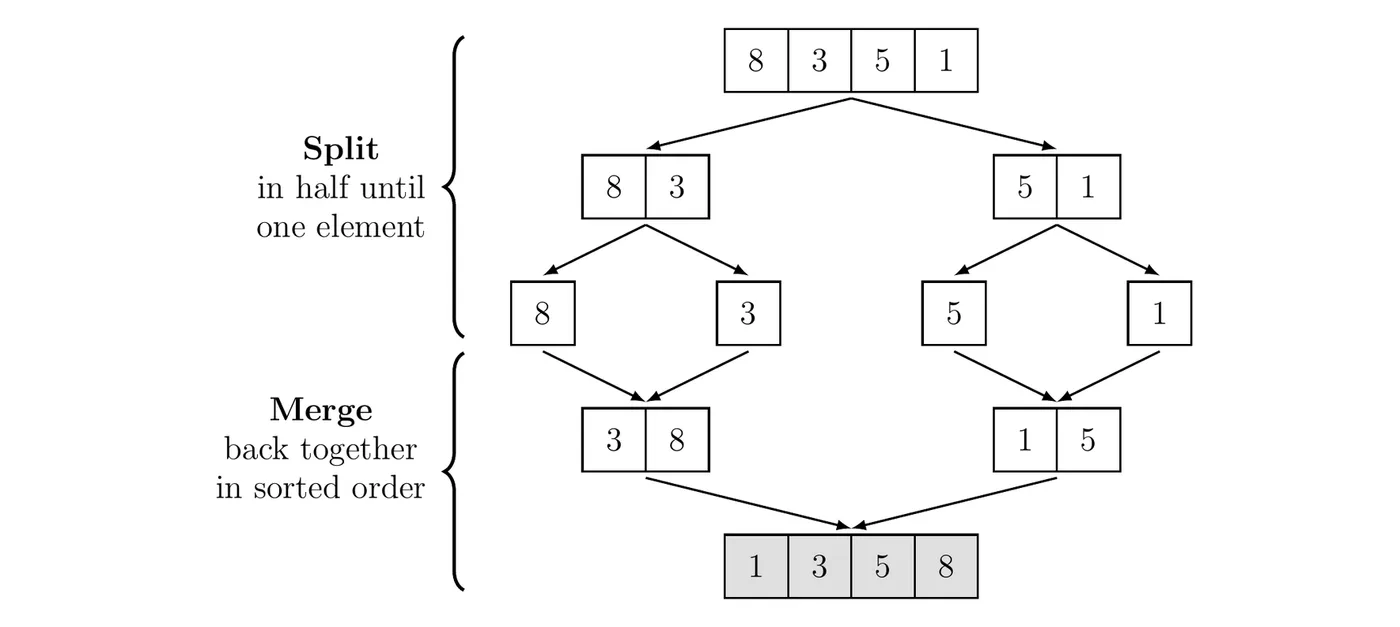
The merge step is where the sorting actually happens. To merge two sorted halves, compare the front values of each half, copy the smaller one into the result, and repeat. When one half runs out, copy whatever is left in the other half. Merging {3, 8} and {1, 5} from the figure:
- Compare 3 and 1. 1 is smaller, so the result is {1}.
- Compare 3 and 5. 3 is smaller: {1, 3}.
- Compare 8 and 5. 5 is smaller: {1, 3, 5}.
- The second half is empty, so copy the 8: {1, 3, 5, 8}.
A bigger example, sorting {6, 2, 9, 4, 1, 7, 3, 8}:
Stage | Pieces |
Start | {6, 2, 9, 4, 1, 7, 3, 8} |
Split | {6, 2, 9, 4} {1, 7, 3, 8} |
Split | {6, 2} {9, 4} {1, 7} {3, 8} |
Split | {6} {2} {9} {4} {1} {7} {3} {8} |
Merge | {2, 6} {4, 9} {1, 7} {3, 8} |
Merge | {2, 4, 6, 9} {1, 3, 7, 8} |
Merge | {1, 2, 3, 4, 6, 7, 8, 9} |
The table shows the pieces level by level. In the actual code, each call finishes sorting its left half before it touches its right half, so {2, 4, 6, 9} is completely done before {1, 7, 3, 8} is even split. The merges themselves are the same either way.
Here’s a common way merge sort is written. You won’t have to write it, but you could be asked to trace it:
public void mergeSort(int[] arr, int[] temp, int from, int to) {
    if (from < to) {
        int middle = (from + to) / 2;
        mergeSort(arr, temp, from, middle);   // sort the left half
        mergeSort(arr, temp, middle + 1, to); // sort the right half
        merge(arr, temp, from, middle, to);   // merge the two sorted halves
    }
}

public void merge(int[] arr, int[] temp, int from, int mid, int to) {
    int i = from;    // next spot in the left half
    int j = mid + 1; // next spot in the right half
    int k = from;    // next spot in temp
    while (i <= mid && j <= to) {
        if (arr[i] < arr[j]) {
            temp[k] = arr[i];
            i++;
        } else {
            temp[k] = arr[j];
            j++;
        }
        k++;
    }
    while (i <= mid) { // copy what's left of the left half
        temp[k] = arr[i];
        i++;
        k++;
    }
    while (j <= to) {  // copy what's left of the right half
        temp[k] = arr[j];
        j++;
        k++;
    }
    for (k = from; k <= to; k++) {
        arr[k] = temp[k]; // copy the merged values back
    }
}

// first call: mergeSort(arr, new int[arr.length], 0, arr.length - 1)
Merge sort works on an
ArrayList the same way. It’s usually much faster than selection sort and insertion sort on large lists, but it needs an extra array to merge into.Note: for the exam, you just need to be able to trace through merge sort step by step and figure out the result at each stage, not write it from scratch. Selection sort, insertion sort, and merge sort are the only three sorting algorithms in scope, and linear and binary search are the only two search algorithms in scope.
BackNext