

3.3 - Protecting Networks: Segmentation
Network Segmentation Techniques
Segmentation divides a big network into smaller, isolated pieces, limiting how far an attack can spread and letting you tailor security to each zone.
Screened Subnets (DMZ)
A screened subnet, or DMZ, sits between the public internet and the internal private network, isolating public-facing resources from sensitive internal systems as a buffer zone.
The typical setup has three zones: the untrusted internet, a lower-security DMZ for things like web servers, email, DNS, and VPN gateways, and a higher-security internal network for things like databases and file servers. A perimeter firewall sits between the internet and the DMZ filtering incoming traffic, and an internal firewall sits between the DMZ and the internal network, keeping a DMZ compromise from spreading inward. The perimeter firewall generally allows specific inbound traffic to DMZ servers while blocking anything trying to reach the internal network directly, and the internal firewall only allows very specific traffic from the DMZ inward (like a web server querying a database on one particular port) while blocking everything else.
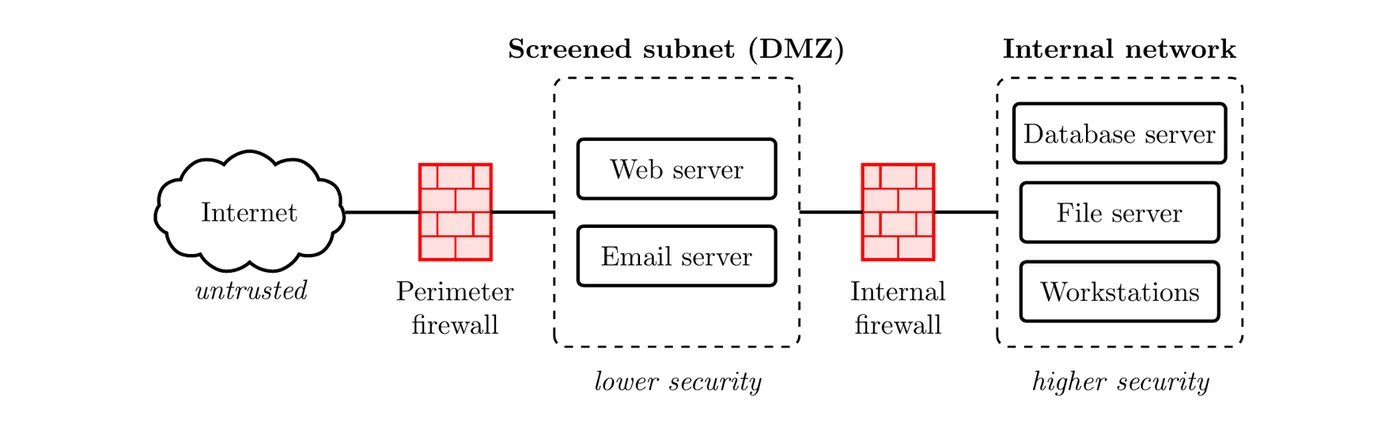
Example: an e-commerce company's public web server sits in the DMZ, querying an internal database only through tightly controlled rules. When an attacker compromises that web server through a vulnerability, they try to move laterally toward customer records, but the internal firewall blocks all but the specific allowed database queries. They can't set up remote access, can't scan the internal network, and can't exfiltrate anything directly, so the compromise stays contained in the DMZ.
Screened subnets help because two firewalls provide layered protection, public-facing servers don't have access to internal resources, breaches stay contained, DMZ systems can be hardened specifically for internet exposure, and security teams can focus monitoring where attacks are most likely.
Subnetting
Subnetting divides a large IP address space into smaller logical networks using subnet masks. For example, a large
192.168.0.0/16 network might get split into separate /24 subnets for accounting, engineering, sales, guest, and servers, with traffic between subnets forced through routers where security policies apply.The number after the slash says how many of the address's 32 bits are the fixed network part. An IPv4 address is four numbers from 0 to 255, and each number is 8 bits, so
/24 fixes the first three numbers and lets only the last one change: 192.168.10.0/24 covers 192.168.10.0 to 192.168.10.255, which is 256 addresses. /16 fixes only the first two numbers, so 192.168.0.0/16 covers 192.168.0.0 to 192.168.255.255, which is 65,536 addresses.Two addresses in every subnet can't go to a device. The first one names the subnet itself (the network address), and the last one is the broadcast address, which reaches every device on the subnet at once (the kind of address a smurf attack abuses). That's why a /24 has 254 usable addresses and a /16 has 65,534.
Here's one way to split the example network:
Subnet | Address range | Used for |
192.168.10.0/24 | 192.168.10.0 to 192.168.10.255 | Accounting |
192.168.20.0/24 | 192.168.20.0 to 192.168.20.255 | Engineering |
192.168.30.0/24 | 192.168.30.0 to 192.168.30.255 | Sales |
192.168.40.0/24 | 192.168.40.0 to 192.168.40.255 | Guest |
192.168.50.0/24 | 192.168.50.0 to 192.168.50.255 | Servers |
A device's address tells you its subnet right away:
192.168.30.57 is in sales, and 192.168.50.8 is a server. Firewall and router rules use the same notation, which is how one rule can cover a whole department.Example: an accounting employee clicks a phishing link and gets infected. Without subnetting, that malware could scan and try to compromise all 65,534 devices across the whole network. With subnetting, it's contained to the roughly 254 devices in the accounting subnet, since router access control lists block it from reaching engineering, most servers, or anywhere else.
Good subnet design groups similar systems together, separates security zones (high, standard, low), isolates servers from user workstations, and keeps network device management on its own subnet.
Router access control lists enforce this, like a rule that only lets web and application servers reach database servers on their specific ports while denying everything else, meaning workstations, IoT devices, or compromised systems simply can't reach the database directly.
Subnetting's security benefits: contained breaches, a smaller attack surface since devices can only talk directly within their own subnet, granular access control per subnet, easier monitoring focused on the higher-risk inter-subnet traffic, and better performance from smaller broadcast domains.
VLANs
VLANs logically separate devices that are physically plugged into the same switch, without needing separate physical hardware. Devices in different VLANs can't talk to each other unless traffic passes through a router, even though they're on the same physical switch, thanks to VLAN tags added to each frame that identify which VLAN it belongs to.
Example: an open floor plan seats accounting and engineering together, all plugged into the same switches. Without VLANs, they're on the same network segment, so an engineering employee experimenting with tools could accidentally capture accounting's sensitive financial traffic. With VLANs assigning accounting to one VLAN and engineering to another, that traffic stays logically separated even on shared hardware, with an inter-VLAN router enforcing what, if anything, can pass between them.
VLANs offer logical segmentation without new hardware, isolate broadcast domains, allow flexible reassignment just by changing a port's config, and achieve segmentation cheaply using existing infrastructure. One important caveat: VLAN hopping attacks can potentially let an attacker cross VLAN boundaries using specially crafted frames, so mitigations include disabling dynamic trunking on access ports, using a dedicated VLAN for trunk ports, and isolating and disabling unused ports.
Example: a hospital sets up separate VLANs for medical devices, clinical workstations, administrative systems, guest Wi-Fi, and building systems, with guest Wi-Fi completely isolated from everything else. A vulnerability in guest Wi-Fi simply can't reach medical devices because there's no communication path between those VLANs at all.
Why Network Segmentation Increases Security
Traffic Isolation and Breach Containment
Without segmentation, all devices sit on one big flat network where anything can talk to anything, so compromising one device effectively gives access to everything.
Example: a company with 500 workstations, 50 servers, and 200 IoT devices all on one unsegmented network gets a single workstation compromised through phishing. From there, the attacker can scan and reach every workstation, server, and IoT device on the entire network, moving laterally with essentially no restriction.
With segmentation, the same attack gets contained. The compromised workstation sits in its own user segment, and every attempt to scan the server segment, connect to databases, reach IoT devices, or spread further gets blocked by router or firewall rules at each segment boundary. Instead of exposing all 750 devices, the compromise might only threaten the roughly 50 devices sharing that one segment, dramatically reducing overall exposure.
Different Security Policies for Different Segments
Segmentation lets you apply different rules to different zones instead of forcing one uniform policy everywhere. A high-security database segment might restrict access to application servers only, require certificate authentication, log every query, and mandate encrypted connections. A standard user workstation segment allows normal business access with MFA and web filtering. A low-security guest segment gets internet-only access with no internal reach at all.
Example: a university sets tighter security around its research labs (restricted to faculty, heavily logged, even air-gapped from the internet in some cases), lighter but still filtered access for student housing (heavy content filtering, bandwidth limits, complete isolation from academic systems), and standard access controls for administrative systems (role-based access, audit logging, encrypted connections). Without segmentation, they'd have to either lock everything down uniformly (frustrating students and researchers) or leave everything open (exposing sensitive data). Segmentation lets each zone get what it actually needs.
These differentiated policies only work because of segmentation. A flat network simply can't enforce something like "only application servers can talk to the database," it's all or nothing without boundaries in place.
Port Security Preventing MAC Flooding
Port security limits how many MAC addresses a switch port will accept, which directly prevents MAC flooding attacks that try to overwhelm a switch's address table with thousands of fake entries. Violations can trigger a full port shutdown, a restriction that just drops unauthorized traffic and logs it, or a quiet drop without logging. Learning modes range from static (manually configured), to dynamic (learned on connection but not saved), to sticky (learned and saved permanently).
Example: a port configured for a maximum of 2 addresses (one for a laptop, one for an IP phone) immediately shuts down and alerts security the moment an attacker tries registering a third address through a flooding tool, stopping the attack before it can fill the switch's table and force it into broadcast mode.
Port security does have limits, like needing higher address limits on ports connecting to hubs or other switches, or needing to allow multiple addresses on server ports running several virtual machines. It typically works alongside 802.1X for user authentication as an extra layer of protection.
Example deployment: a financial institution sets a max of 1 address on user workstation ports (shutdown on violation), 2 on VoIP ports for PC plus phone (restrict on violation), 10 on server ports for virtual machines (protect on violation), and disables port security entirely on trunk ports that legitimately carry multiple VLANs. An attacker plugging into an unused conference room port with no authorized MAC address gets shut down immediately with security alerted, stopping the breach before any access is gained.
Port security works alongside VLANs, subnetting, and firewalls as one more layer, meaning even if an attacker bypasses physical security and plugs in, and even spoofs an authorized MAC address to get past port security, they'd still be isolated within a VLAN with limited reach to other segments.
Segmentation as Foundational Security Architecture
Segmentation isn't one single tool, it's a whole architectural approach combining DMZs, subnetting, VLANs, and port security together to build defense in depth. It reduces the blast radius of any compromise, allows tailored controls per zone, improves monitoring by focusing on high-value segments and inter-segment traffic, supports compliance requirements like PCI-DSS and HIPAA, improves performance through smaller broadcast domains, and simplifies troubleshooting by isolating problems to specific segments. Modern security thinking basically assumes a breach will eventually happen somewhere, and segmentation is what keeps a single compromise from cascading into a full-blown organizational catastrophe.