

3.5 - Detecting Network Attacks
Automated Security Detection Tools
Data Collection and Logging
Automated detection tools pull data from all over the network: switches, routers, and wireless access points logging connection attempts and config changes, firewalls recording permitted and denied connections, servers logging authentication and file access, and user computers logging security software and authentication events. All of this shows up as timestamped log entries, like a single firewall log line showing the date, source device, action taken, protocol, source and destination, and the reason it was blocked. Organizations generate millions of these entries a day, way more than any human could review manually, which is exactly why automated tools are essential.
Network Intrusion Detection Systems (NIDS)
A NIDS passively watches network traffic, analyzes it for signs of malicious activity, and generates alerts, but it doesn't block anything itself. It usually connects to a network segment through a mirrored switch port so it can observe traffic, checking packet headers and contents against known attack signatures and behavioral patterns, and alerting security when it spots something.
Example: a NIDS watching traffic between the DMZ and internal network notices a web server making unusual connection attempts to multiple internal databases it normally never touches. Comparing this against its baseline, it flags the anomaly and alerts security, who investigate, find the server's been compromised, and isolate it before anything sensitive gets reached.
The key thing about NIDS: it's detective, not preventative. It spots attacks in progress but doesn't stop them, that part depends on a human or another system acting on the alert.
Network Intrusion Prevention Systems (NIPS)
A NIPS does everything NIDS does but also takes action automatically to block or limit an attack. Unlike NIDS, it sits directly inline in the traffic path so all traffic actually flows through it, letting it block malicious traffic in real time within milliseconds, whether by closing specific ports, blacklisting an IP or MAC address, dropping traffic on a bad protocol, resetting a malicious TCP session, or rate-limiting a suspicious source.
Example: a NIPS watching internet-to-DMZ traffic spots SQL injection attempts against a web app, matches them against its attack signatures, immediately blocks the malicious packets, blacklists the attacker's IP for an hour, and alerts security, all within milliseconds, before the web app ever even sees the malicious requests.
The tradeoff is that NIPS can accidentally block legitimate traffic if it misidentifies something (a false positive), it needs powerful hardware since it's inspecting everything inline without becoming a bottleneck, and it requires careful tuning to balance security against keeping things available.
The core difference: NIDS is passive and only alerts, while NIPS sits inline and can actually block traffic immediately. A false positive on NIDS just means an unnecessary alert, while a false positive on NIPS means legitimate traffic actually gets blocked, so NIPS has a bigger availability tradeoff but also a much faster, more automatic response.
Security Information and Event Management (SIEM)
A SIEM pulls together and correlates data from everywhere across the infrastructure, firewalls, NIDS/NIPS, servers, apps, authentication systems, databases, endpoints, all normalized into a consistent format so it can spot patterns spanning multiple systems that individual tools would miss on their own. It also stores historical data for forensic investigation.
Example of what SIEM catches that nothing else would: a series of failed VPN logins from one IP look unremarkable on their own, a successful login after those failures still looks fine in isolation, a large file download looks like normal work, and an outbound HTTPS connection looks totally standard. But correlated together by a SIEM, they reveal a clear pattern: a brute force attack that eventually succeeded, followed by an abnormal download volume, followed by a suspicious connection to an unfamiliar external server, all from a login location that doesn't match the user's usual pattern and at an hour they never normally work. No single system saw the attack, but the SIEM tying it all together generates a high-confidence alert recommending immediate account disablement, IP blocking, and workstation isolation.
When a SIEM fires an alert, analysts typically follow a standard process: triage the alert and its confidence level, investigate by gathering more evidence, classify it as a real threat or false positive, contain it if it's real, escalate to incident response if needed, document everything, and finally resolve and remediate.
Most organizations write these steps down as standard operating procedures (SOPs), so every analyst resolves or escalates an alert the same way.
AI-Enhanced Threat Detection
The Data Volume Challenge
Modern networks generate way more data than people can manually review. A mid-sized organization with 2,000 employees might generate over 65 million security events a day across firewalls, IDS/IPS, servers, endpoints, authentication, and apps. Even if a single analyst reviewed one event per second nonstop, that's only 86,400 events a day, meaning you'd need over 750 analysts to cover everything. Even 100 analysts working around the clock could only review about 13% of events, leaving nearly 87% completely unexamined, which is exactly where attacks can hide.
AI for Pattern Classification
AI gets trained on millions of examples of both malicious and normal traffic, learns what actually distinguishes an attack from ordinary activity, and then applies that learned model to real-time traffic, calculating a probability that something is malicious.
A traditional rule like "alert if more than 100 failed logins in 5 minutes" can be evaded just by staying under that threshold or spreading attempts out over time. An AI system instead learns each user's normal patterns, like typical login times, typical locations, typical success rates, and typical session lengths, and flags anything that deviates significantly, even if it doesn't technically break any hard-coded rule.
Example: a user's login at an unusual hour, from an unfamiliar location, with an abnormal number of rapid failed attempts, followed by what looks like a simultaneous login from two places at once, all combine into a calculated 97.7% probability of malicious behavior, even though none of it violates a simple rule on its own.
Probabilistic Risk Scoring
AI models don't just say "malicious" or "benign," they output a confidence percentage based on multiple weighted factors.
Example: a connection gets scored at 73% likely malicious based on the destination IP showing up in past malware campaigns, the odd timing at 2 AM, the unusually large data transfer, encrypted traffic that can't be inspected, and the fact that this particular workstation has no legitimate business reason to be transferring data externally. That 73% means high likelihood, but not absolute certainty.
Alert Threshold Configuration
Organizations set a threshold deciding what confidence level actually triggers an alert. A high threshold like 85%+ generates fewer alerts and keeps the security team from getting overwhelmed, but real attacks sitting at 70 to 84% confidence slip through undetected. A low threshold like 30%+ catches more real attacks but buries the team in false positives. For example, with a threshold set at 85%, an organization might catch 80% of real attacks but see a 33% false positive rate; lowering the threshold to 50% might catch 95% of attacks but push the false positive rate up to 79%; a middle ground around 70% might land at 90% detection with a 64% false positive rate. It's a genuine tradeoff between catching more attacks and overloading analysts, and some advanced systems adjust thresholds dynamically based on context, like tightening them for high-security networks.
Network Detection Methods
Signature-Based Detection
This method compares traffic against a database of known attack patterns, like specific packet sequences, known malware communication patterns, or exploit attempt signatures. If a match is found, it alerts; if not, it's treated as benign.
Each known pattern in the database is a signature: a stored indicator of compromise (IoC) from an attack that's already been seen. A signature-based system can only recognize what's in its database, so the database has to be updated with IoCs from the latest attacks.
Example signatures might flag a SQL injection attempt matching a UNION SELECT pattern, or a specific known ransomware's network communication pattern.
This approach works great for high-traffic networks since it's computationally efficient and can handle huge volumes of traffic with minimal performance hit, and it's very effective against well-documented, known attacks. Its big weakness is that it can't catch anything new, zero-days and novel techniques simply have no matching signature, it needs constant updates to keep its database current, and attackers can often dodge it just by slightly modifying their attack.
Anomaly-Based Detection
This method builds a baseline of what normal traffic looks like (typical data volumes, protocols, connection frequency, timing) and flags anything that deviates significantly from it.
The baseline has to be recorded while the systems are known to be uncompromised, so it shows the data types and volumes that are actually normal. Around it, the organization sets a tolerance range: an upper and lower limit for how far activity can drift. Anything inside the range is treated as normal. Data types or volumes outside it, whether too high or too low, trigger an alert or an automatic action.
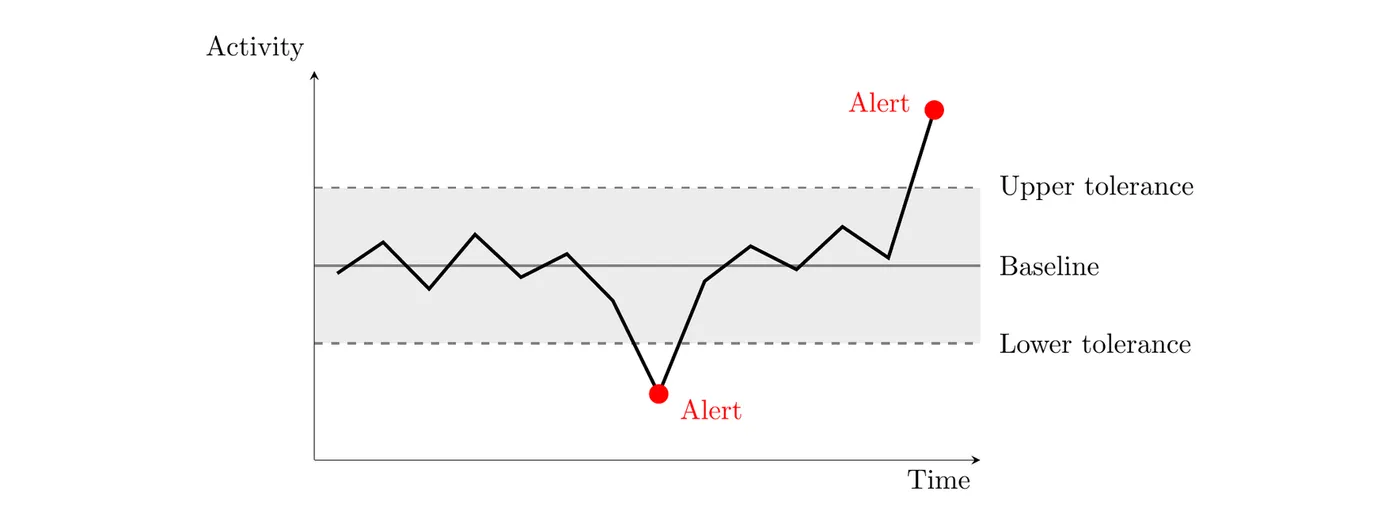
Example: a file server normally sees around 250 connections an hour and 15 GB of transfer during business hours. When it suddenly sees 1,850 connections and 280 GB of transfer at 2:47 AM from unusual sources, that massive deviation triggers an immediate high-priority alert, which investigation reveals to be ransomware rapidly encrypting files.
This works best in environments with consistent, predictable traffic patterns, like standard corporate networks or industrial control systems, and it's genuinely good at catching zero-day and previously unknown attacks based purely on abnormal behavior. The downsides are that it needs a clean baseline (if an attacker's already active during baseline creation, their behavior gets learned as "normal"), it tends toward more false positives since legitimate but unusual activity (like a big marketing traffic spike) can trigger alerts, it's more computationally expensive, and it struggles badly on networks with genuinely variable traffic, like a university network where activity swings wildly between semesters, exam periods, and time of day.
Hybrid Detection
Hybrid detection runs both signature and anomaly engines in parallel on the same traffic, generating an alert if either one flags something.
Example: signature scanning finds nothing suspicious, but anomaly detection notices an unusual spike in outbound DNS queries, thousands more than normal in just a few minutes. Investigation reveals DNS tunneling being used for data exfiltration, a technique with no matching signature but with an obviously abnormal traffic pattern that anomaly detection caught.
Hybrid makes sense for high-sensitivity environments needing to catch both known and unknown threats, places with compliance requirements demanding layered detection, and high-value targets likely facing both common and sophisticated attackers, like hospitals balancing HIPAA compliance with protecting safety-critical medical devices. The tradeoff is cost: hybrid systems need more powerful hardware, pricier licensing, and a bigger security team to handle the higher alert volume, typically running 2.5 to 3 times the cost of a signature-only setup.
Choosing a Detection Method
The right method depends on traffic volume (high volume favors signature-based for efficiency), pattern consistency (consistent patterns favor anomaly-based, since a good baseline is achievable), data sensitivity (high sensitivity favors hybrid for comprehensive coverage), and how likely novel attacks are (higher likelihood favors anomaly or hybrid to catch unknowns). For example, high-traffic but inconsistent environments like e-commerce sites or guest Wi-Fi tend to favor signature-based detection, consistent medium-traffic corporate networks favor anomaly-based, and high-sensitivity, high-novel-attack-risk environments like financial trading systems or industrial control systems favor hybrid.
All four criteria at a glance:
Criterion | Points toward | Why |
High traffic volume | Signature-based | Runs faster and handles large volumes efficiently |
Consistent traffic patterns | Anomaly-based | A steady baseline makes real anomalies stand out |
Sensitive or critical data or services | Hybrid | Catches known and new attacks, worth the higher cost and extra alerts |
New (novel) attacks likely | Hybrid, or anomaly-based if hybrid costs too much | Signature-based can't detect an attack it has no signature for |
Evaluating Detection Method Impact
Speed: signature-based detection is fastest, processing traffic essentially at line speed with microsecond latency, while anomaly-based detection is slower due to the statistical analysis involved, sometimes adding several milliseconds of latency, which matters a lot on very high-volume networks.
Cost: signature-based setups need the least hardware, software licensing, and staff. Anomaly-based needs more of all three due to the computational load and higher false positive rate needing more investigation. Hybrid needs the most of all, combining both engines and generating the most total alerts.
False positive rate: signature-based detection has very few false positives, usually under 1%, since its matches are highly specific. Anomaly-based runs higher, typically 10 to 30%, since legitimate but unusual activity can trip it. Hybrid runs highest overall, 15 to 40%, since it combines alerts from both methods. High false positive rates waste analyst time and can lead to alert fatigue, where a real attack eventually gets dismissed as "probably another false positive" and goes unnoticed for days, which is exactly why continuous tuning matters.
False negative rate (missed real attacks): signature-based has the highest false negative rate since it simply can't catch anything without a matching signature, especially novel or modified attacks. Anomaly-based has a lower false negative rate since it catches attacks based on abnormal behavior regardless of whether they're previously known. Hybrid has the lowest false negative rate overall. Missed attacks matter because they mean breaches go undetected, sometimes for hundreds of days, giving attackers far more time to exfiltrate data, move laterally, and cause damage before anyone notices.
Putting the four factors together:
Factor | Signature-based | Anomaly-based | Hybrid |
Speed | Fastest | Slower, especially at high traffic volume | Signature side is fast; anomaly side is slower |
Cost | Lowest | Higher (needs more expensive hardware) | Highest (runs both) |
False positives | Almost none | Higher | Higher, and the most total alerts |
False negatives | Highest (easiest to bypass, misses new attacks) | Lower | Lowest |
Detecting Specific Network Attacks
Evil twin detection: regularly scan for all wireless networks in range and flag suspicious SSIDs, like ones with subtle name variations from a legitimate network, or multiple networks broadcasting identical names. Signal triangulation using multiple receivers can then physically locate the rogue access point for removal.
Example: a wireless scan at a clinic shows these networks:
SSID              BSSID (AP's MAC)     Channel  Signal    Security
Clinic-Staff      00:00:5e:00:53:a1    1        -52 dBm   WPA3-Enterprise
Clinic-Staff      00:00:5e:00:53:a2    6        -58 dBm   WPA3-Enterprise
Clinic-Guest      00:00:5e:00:53:a3    11       -60 dBm   WPA2-Personal
Clinic_Staff      00:00:5e:00:53:7c    6        -41 dBm   Open
Two access points named
Clinic-Staff is normal, since bigger networks use several access points with the same SSID. The last line is the problem: its name differs from the real one by a single character (_ instead of -), its BSSID isn't on the clinic's list of known access points, and it's an open network, which the real staff network never is. Signal triangulation (measuring its signal strength from several spots) leads to the device so it can be found and disabled.Jamming detection: look for complete, sudden wireless connectivity loss across a physical area (no wireless device in that space can connect) with no configuration changes on the actual equipment, then use a spectrum analyzer to scan for electromagnetic (EM) noise in the wireless range, confirming overwhelming interference on a specific frequency, which can help physically locate a hidden jammer.
ARP poisoning detection: watch for unusual ARP activity, like excessive requests or responses, duplicate IPs mapped to different MAC addresses, or one MAC claiming multiple IPs. A log showing the same IP suddenly associated with two different MAC addresses is a clear giveaway.
Example: a NIDS logs these ARP replies on a network whose default gateway is
192.168.1.1:2026-03-02 10:14:05 ARP Reply: 192.168.1.20 is-at 00:00:5e:00:53:20 2026-03-02 10:20:41 ARP Reply: 192.168.1.35 is-at 00:00:5e:00:53:35 2026-03-02 10:31:12 ARP Reply: 192.168.1.1 is-at 00:00:5e:00:53:35 2026-03-02 10:31:12 ARP Reply: 192.168.1.20 is-at 00:00:5e:00:53:35
The MAC address
00:00:5e:00:53:35 belongs to the device at 192.168.1.35, but at 10:31 it starts claiming to be the gateway (192.168.1.1) and the file server (192.168.1.20) too. One MAC address answering for three IP addresses is the duplicate MAC pattern that points to ARP poisoning. Checking the ARP table on the default gateway would confirm it: 192.168.1.20 would be paired with 00:00:5e:00:53:35 instead of its real MAC address.MAC flooding detection: watch for a sudden massive spike in MAC addresses registered on a single switch port, jumping from a handful to thousands within seconds, which is a strong sign of an active flooding attack.
Example: here's a summary of a switch's MAC address table, showing how many MAC addresses each port has learned:
Port  Connected to           MAC addresses learned
1     Front desk PC          1
2     IP phone + laptop      2
3     Printer                1
4     Conference room jack   7,912
5     Unused                 0
Ports 1 to 3 match what's plugged into them. Port 4 learned thousands of addresses from one wall jack, which is the surge of Ethernet frames with different MAC addresses that marks MAC flooding. Port security limited to 1 or 2 addresses (see 3.3) would have shut that port down at the first extra address.
DNS poisoning detection: this one's tricky since poisoned records look legitimate to clients. Indirect signs include unexplained drops in website traffic, users reporting they were sent to the wrong site, or comparing current DNS records against known-good backups. For example, a company's traffic dropping from 50,000 to 5,000 daily visitors over a few days with no marketing changes might reveal, on investigation, that the site's DNS record was quietly changed to point to a competitor's IP.
Smurf attack detection: watch for a sudden massive spike in ICMP echo requests targeting a broadcast address, all claiming the same spoofed source IP (the actual victim), which is a clear sign of amplification-based flooding.
Example: a firewall log shows ICMP traffic headed to the network's broadcast address,
192.168.1.255:Time Source IP Destination IP Protocol Type Count (10 s) 09:14:00 192.168.1.40 192.168.1.255 ICMP echo request 2 09:14:10 203.0.113.50 192.168.1.255 ICMP echo request 3,916 09:14:20 203.0.113.50 192.168.1.255 ICMP echo request 4,102 09:14:30 203.0.113.50 192.168.1.255 ICMP echo request 4,055
A couple of echo requests now and then is normal. Thousands every 10 seconds, all aimed at the broadcast address and all claiming the same source, is a smurf attack. That source address is spoofed:
203.0.113.50 is the victim, and every device on the network is replying to it.General network indicators of compromise: connections to known malicious IPs from threat intelligence feeds, unauthorized port scanning across a network range, unusual traffic volume spikes or slowdowns suggesting exfiltration or DoS, and mismatched traffic like HTTP running on a non-standard port or encrypted traffic where plaintext is expected. For example, a workstation transferring 2.3 GB to a known command-and-control server at nearly 4 AM, with no legitimate business reason for external transfers and a pattern matching a known malware family, gives high confidence of active data exfiltration and warrants immediate isolation.
Example: here's part of a packet capture summary from a small office. The security team's threat intelligence feed lists
198.51.100.23 as a known malicious IP address.No. Time Source Destination Dst port Traffic seen 1 13:02:11 192.168.1.44 192.168.1.10 21 connection attempt 2 13:02:11 192.168.1.44 192.168.1.10 22 connection attempt 3 13:02:11 192.168.1.44 192.168.1.10 23 connection attempt 4 13:02:11 192.168.1.44 192.168.1.10 25 connection attempt 5 13:02:12 192.168.1.44 192.168.1.10 80 connection attempt 6 13:05:37 192.168.1.17 198.51.100.23 443 HTTPS 7 13:06:02 192.168.1.29 203.0.113.80 53 SSH
Lines 1 to 5: one device tries five different ports on the same server within about a second. That's an unauthorized network scan, someone mapping which services the server runs.
Line 6: a workstation connects to a known malicious IP address. The traffic itself is ordinary HTTPS; the destination is the problem.
Line 7: traffic to port 53, the DNS port, that's actually an SSH session. That's mismatched port-application traffic, often a way to sneak a connection past rules that allow DNS.
Detection systems, whether automated tools, AI-enhanced analysis, or the right combination of detection methods for a given network's characteristics, give organizations the visibility they need to catch and respond to threats before attackers accomplish their goals.