Distribute and factor out the constant (Properties 5 and 3):
=∫−21f(x)dx+2∫−21g(x)dx=4+2(8)=20
Problem 6:∫01f(x)dx
Cannot be determined. We know ∫−21f(x)dx=4, but that covers both [−2,0] and [0,1]. Without knowing how the area is distributed between those sub-intervals, we can’t isolate [0,1].
No width means no area, no matter what the functions are.
Piecewise Functions
Integrate each piece separately on its own domain, then add the results.
Example
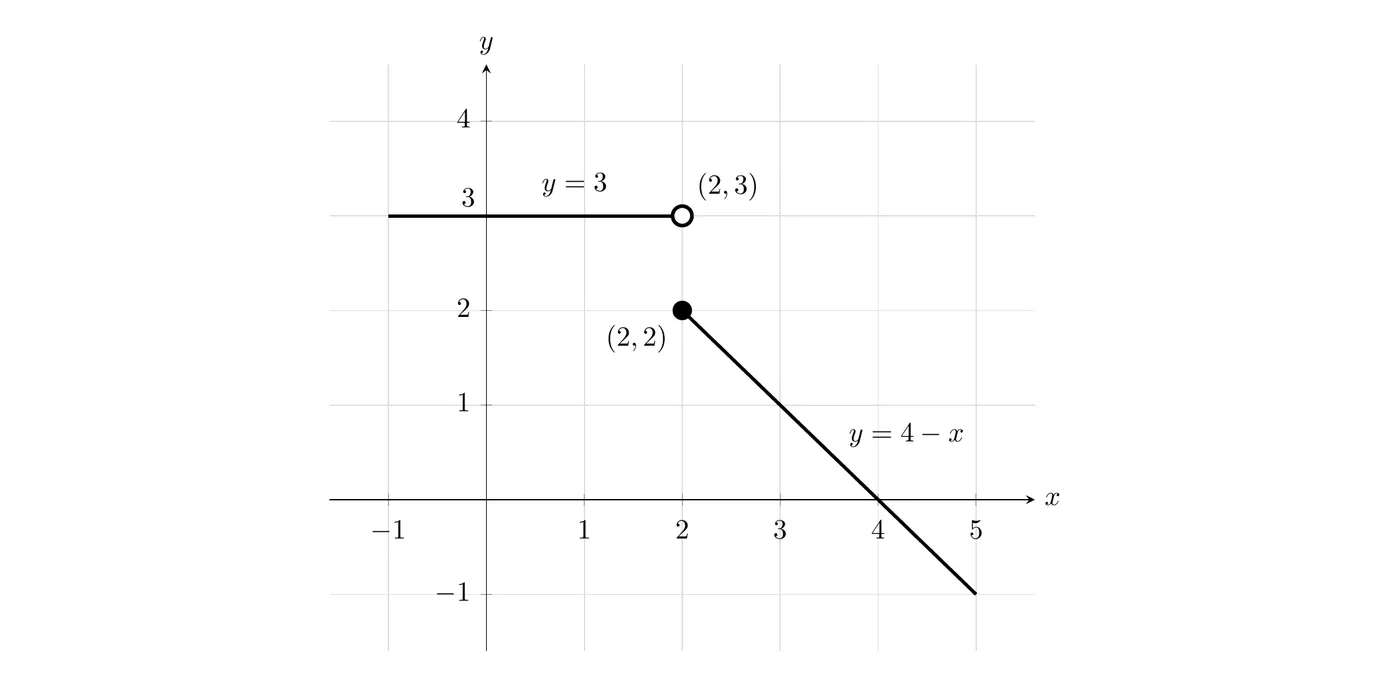
f(x)={34−xx<2x≥2
Find ∫15f(x)dx. Break it at x=2:
∫15f(x)dx=∫123dx+∫25(4−x)dx
From 1 to 2: a rectangle of width 1 and height 3
∫123dx=3
From 2 to 4: a triangle above the x-axis, base 2 and height 2
A1=21(2)(2)=2
From 4 to 5: a triangle below the x-axis, base 1 and height 1
A2=−21(1)(1)=−0.5
Total:
∫15f(x)dx=3+2−0.5=4.5
Key point: even though there’s a jump at x=2, we still measure area from the function down to the x-axis the same way.
The same goes for a removable discontinuity (a hole, or one point moved off the graph). A single point has no width, so it adds no area and doesn’t change the integral. For example, if h(x)=2 for every x except h(3)=7, then ∫05h(x)dx=2⋅5=10, exactly the same as for the constant function y=2.
Absolute Value Functions
Absolute value functions make piecewise linear graphs, usually V-shapes.
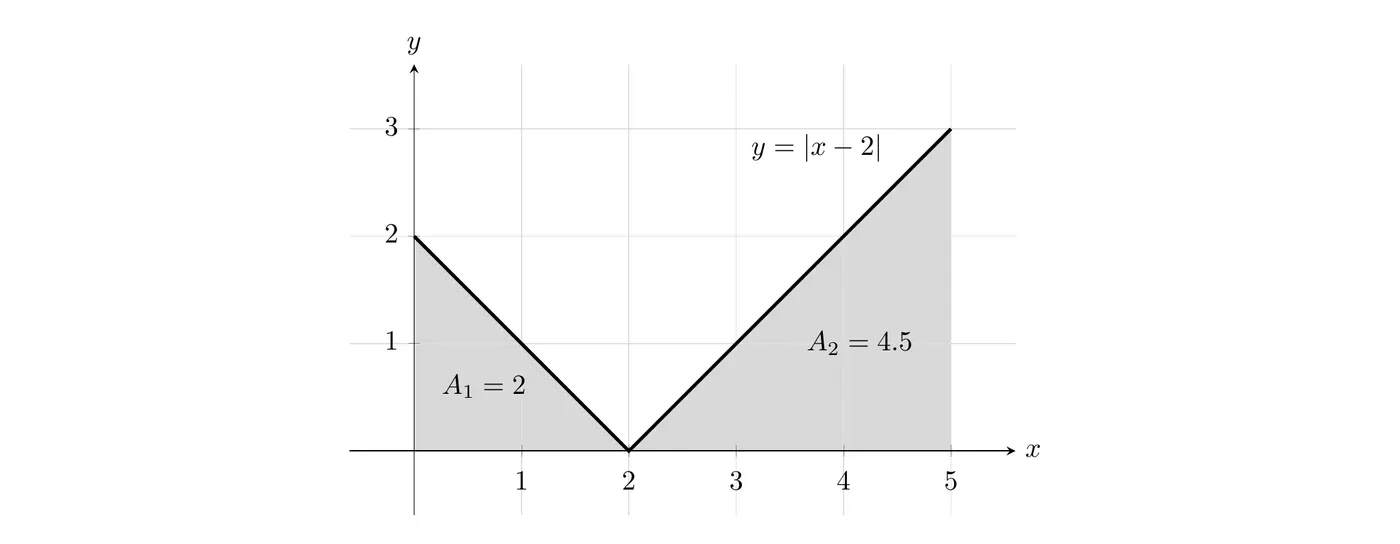
Example: ∫05∣x−2∣dx
Split at the vertex x=2.
From 0 to 2: triangle with base 2, height 2
A1=21(2)(2)=2
From 2 to 5: triangle with base 3, height 3
A2=21(3)(3)=4.5
Total:
∫05∣x−2∣dx=2+4.5=6.5
Absolute Value: Inside vs. Outside the Integral
Case 1: absolute value OUTSIDE
∫abf(x)dx
Calculate the integral using signed areas
Take the absolute value of the result
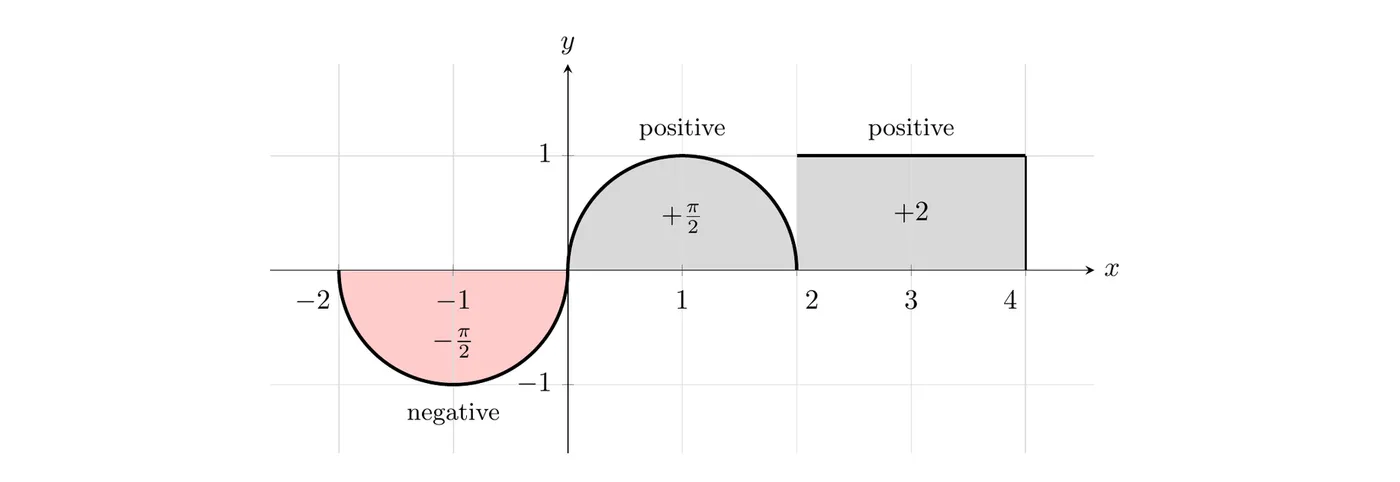
Calculate with signs:
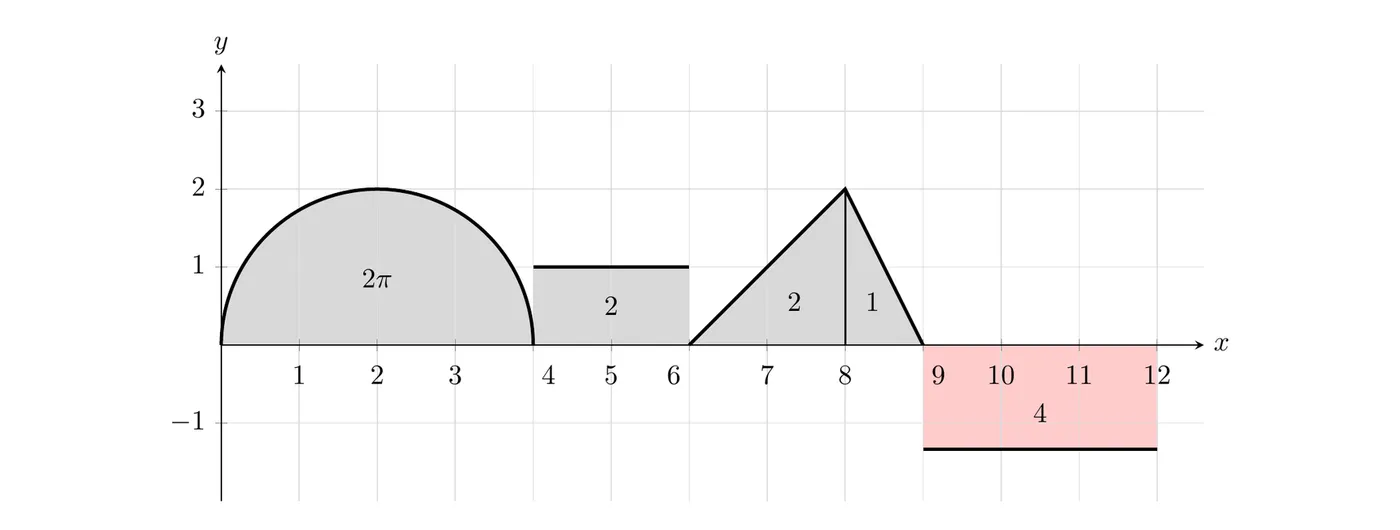
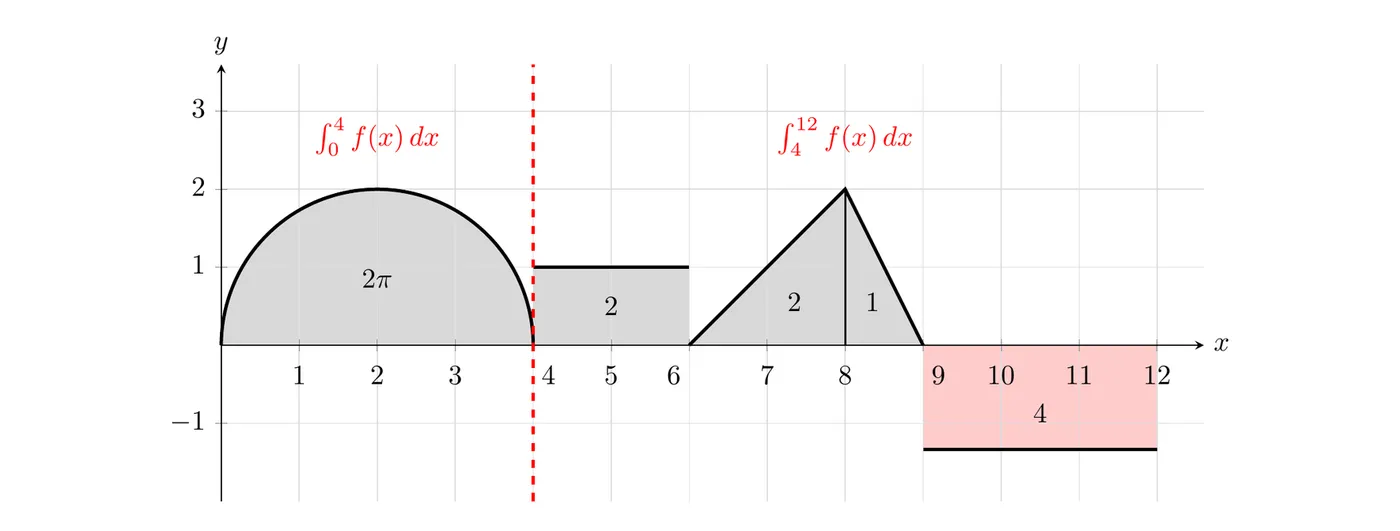
∫−24f(x)dx=−2π+2π+2=2
Take the absolute value:
∫−24f(x)dx=∣2∣=2
Case 2: absolute value INSIDE
∫ab∣f(x)∣dx
All areas become positive (the negative regions flip above the axis)
Add up the total positive area
Using the same function:
∫−24∣f(x)∣dx=2π+2π+2=π+2
The key difference
Type
Meaning
Negative areas?
∫abf(x)dx
Absolute value of the net area
Yes, they cancel normally
∫ab∥f(x)∥dx
Total area, all positive
No, they all flip positive
Using a Calculator to Evaluate Integrals
For integrals that are painful by hand, the TI-84 has a built-in function.
Steps
Press MATH
Select option 9:fnInt(
Enter fnInt(function, x, lower limit, upper limit)
Press ENTER
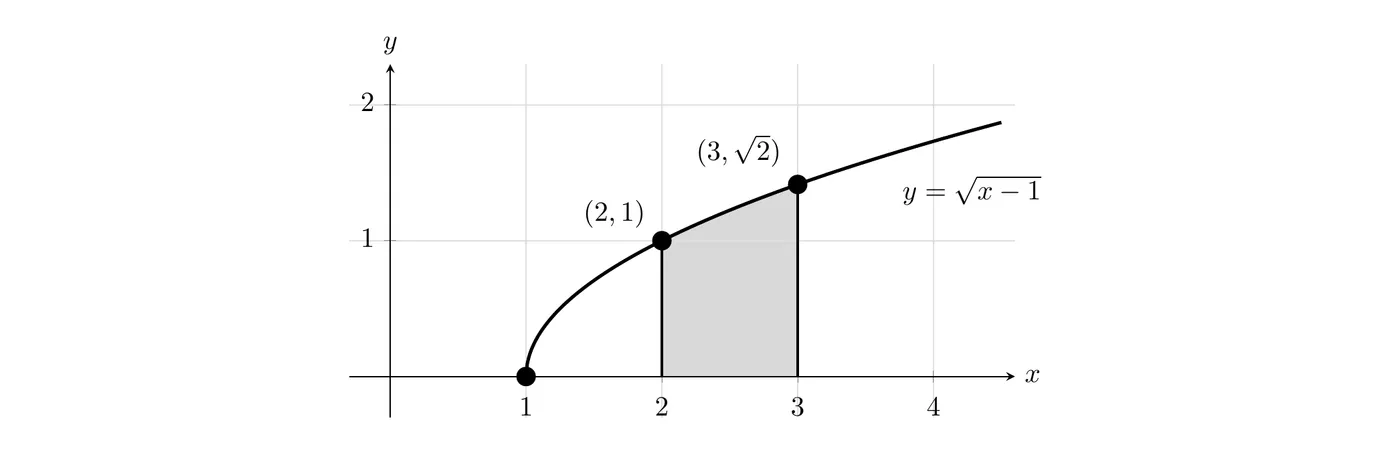
Example 1:∫23x−1dx
MATH → 9
fnInt(√(x-1), x, 2, 3)
Result: about 1.219
Example 2:∫04(4−x2)dx
fnInt(4-x², x, 0, 4)
Result: about −5.333
Why negative? The parabola y=4−x2 dips below the x-axis after x=2, and on this interval the negative region outweighs the positive one.
When to use the calculator
Complex functions (radicals, trig, exponentials)
When it’s allowed on the problem
To check your work
When the geometric approach isn’t obvious
Careful: on free-response sections you may still need to show work by hand.
Key Takeaways
Reversal of limits:∫baf(x)dx=−∫abf(x)dx
Identical limits:∫aaf(x)dx=0
Constant multiple:∫abcf(x)dx=c∫abf(x)dx
Additivity:∫abf(x)dx=∫acf(x)dx+∫cbf(x)dx
Sum and difference: integrals distribute over addition and subtraction
Piecewise functions: integrate each piece on its domain, then add
Absolute value as piecewise: think V-shapes, and split at the vertex
Absolute value outside: calculate the integral first, then take the absolute value
Absolute value inside: all areas become positive, no negative regions
Calculator: TI-84 uses MATH → 9:fnInt(function, x, a, b)
Cannot determine: some problems just don’t give you enough information
dx means integration with respect to x, moving along the x-axis