

1.5 - Graphical Representations for One Quantitative Variable
Overview
For a quantitative variable, a graph has to show which values occur and how often, in order along a number line. This topic covers the three main graphs for one quantitative variable: dotplots, stem-and-leaf plots, and histograms. Making them correctly comes first. Describing what they show (shape, center, variability, and unusual features) is Topic 1.6.
Graphing a distribution
The distribution of a variable tells you what values the variable takes and how often it takes each value. Histograms, stem-and-leaf plots, and dotplots give a picture of the distribution of a quantitative variable. They show the frequency or relative frequency of each value, or of each interval of values, and they keep the natural order of the numbers, from smallest to largest. Unlike the bars in a bar chart, you can't rearrange them.
Most of this page uses one data set. These are the commute times, in minutes, of 25 students, in the order they were collected:
15, 22, 8, 30, 12, 18, 45, 10, 15, 25, 7, 12, 20, 35, 14, 15, 28, 5, 18, 40, 12, 20, 10, 25, 15
Dotplots
A dotplot shows each value as a dot above a number line, at the spot for that value. Values that are the same, or nearly the same, are stacked on top of each other.
To make one:
- Draw a horizontal axis with an evenly spaced scale that covers the smallest to largest values. Label it with the variable and its units.
- Put one dot above the axis for each value, stacking dots for repeated values.

Each dot is one student. The stack of four dots above 15 means four students have a 15-minute commute. A dotplot can also be drawn sideways, with the dots placed beside a vertical axis.
Stem-and-leaf plots
A stem-and-leaf plot (or stemplot) splits each value into two parts: a stem, the first digit or digits, and a leaf, usually the single digit after the stem. For a commute of 15 minutes, the stem is 1 and the leaf is 5.
To make one:
- Write the stems in a column from smallest to largest, with a vertical line to their right. Include every stem in the range, even if it gets no leaves, so gaps in the data show up.
- Write each value's leaf beside its stem.
- Put the leaves on each line in order from smallest to largest.
- Add a key that shows how to read a value, such as = 15 minutes.
Example 1: Making a stemplot
Make a stemplot of the 25 commute times.
Step 1: The times go from 5 to 45 minutes, so the stems are the tens digits 0, 1, 2, 3, and 4.
Step 2: Go through the data in order and write each leaf (the ones digit) beside its stem. The first value, 15, puts a 5 beside stem 1. The second, 22, puts a 2 beside stem 2, and so on.
Step 3: Sort each row's leaves from smallest to largest, and add the key.
Step 4: Check that there are 25 leaves in all: .
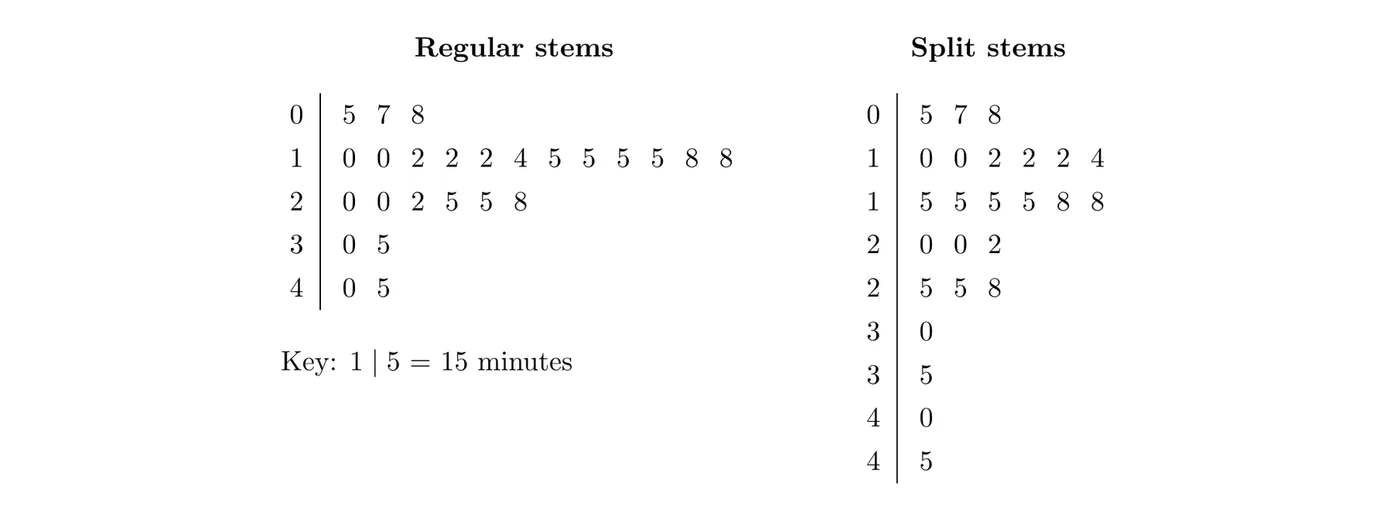
The left plot is the finished stemplot. It keeps every value, so you can read the data back: the row means 10, 10, 12, 12, 12, 14, 15, 15, 15, 15, 18, and 18 minutes.
Splitting stems
When most values pile up on a few stems, you can split each stem into two lines: the first gets leaves 0 to 4, and the second gets leaves 5 to 9. The right plot above does this. The crowded 10s row becomes two rows, which shows more detail about where the data bunch up. (Stem 0 starts at its second line, since no time is under 5 minutes.)
Values with more digits
Leaves are single digits, so round extra digits first. A weight of 152.4 pounds becomes stem 15 and leaf 2 (key: = 152 pounds). For data like 3.4, the stem can be the ones digit and the leaf the tenths digit.
Histograms
A histogram places the values of a quantitative variable into ordered intervals, called bins, along the horizontal axis. Each bar represents one bin, and the height of the bar shows the frequency or relative frequency of the values in that bin.
- The bins all have the same width, cover the whole range of the data, and don't overlap.
- The bars touch, because the bins cover a continuous stretch of the number line. A space between bars means an empty bin, with no data in that interval.
- A value on a boundary goes in the bin it starts. With bins 10 to under 20 and 20 to under 30, a value of exactly 20 goes in the 20 to under 30 bin.
Example 2: Building a histogram
Make a histogram of the commute times using bins 10 minutes wide.
Step 1: Choose bins that cover 5 to 45: 0 to under 10, 10 to under 20, and so on up to 40 to under 50.
Step 2: Count the values in each bin. Boundary values go up: both 10s go in 10 to under 20, both 20s go in 20 to under 30, and 30 and 40 start their own bins.
Step 3: For a relative frequency histogram, divide each count by 25.
Commute time (minutes) | Frequency | Relative frequency |
0 to under 10 | 3 | 0.12 |
10 to under 20 | 12 | 0.48 |
20 to under 30 | 6 | 0.24 |
30 to under 40 | 2 | 0.08 |
40 to under 50 | 2 | 0.08 |
Total | 25 | 1.00 |
Step 4: Draw a bar for each bin, touching its neighbors, as tall as the bin's count. Label both axes.
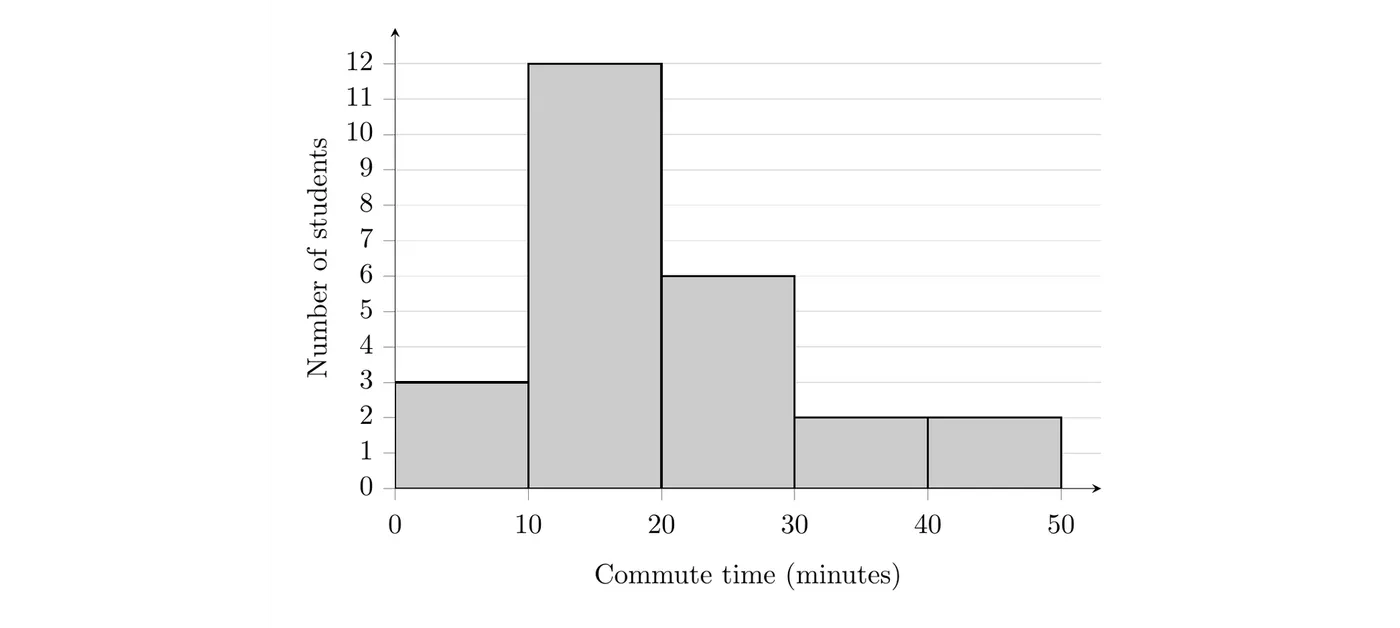
What it shows: 12 of the 25 students (48%) commute 10 to under 20 minutes, the tallest bar, and only 4 students (16%) commute 30 minutes or more. A relative frequency histogram of the same data looks exactly the same; only the vertical axis changes, showing 0.12, 0.48, 0.24, 0.08, and 0.08 instead of the counts.
On the TI-84: enter the data in L1 (STAT, 1:Edit). Press 2nd Y= (STAT PLOT), turn Plot1 on, choose the histogram icon, and set Xlist to L1 and Freq to 1. Press ZOOM, 9:ZoomStat. To set the bins yourself, press WINDOW and enter Xmin = 0, Xmax = 50, Xscl = 10 (Xscl is the bin width), and a Ymax just above the tallest bar, like 13. Press GRAPH, then TRACE to see each bin's count.
Bin width changes the picture
Changing the bin width can change how a histogram looks, even though the data are the same. Here are the same 25 commute times with bins 5 minutes wide and 20 minutes wide:
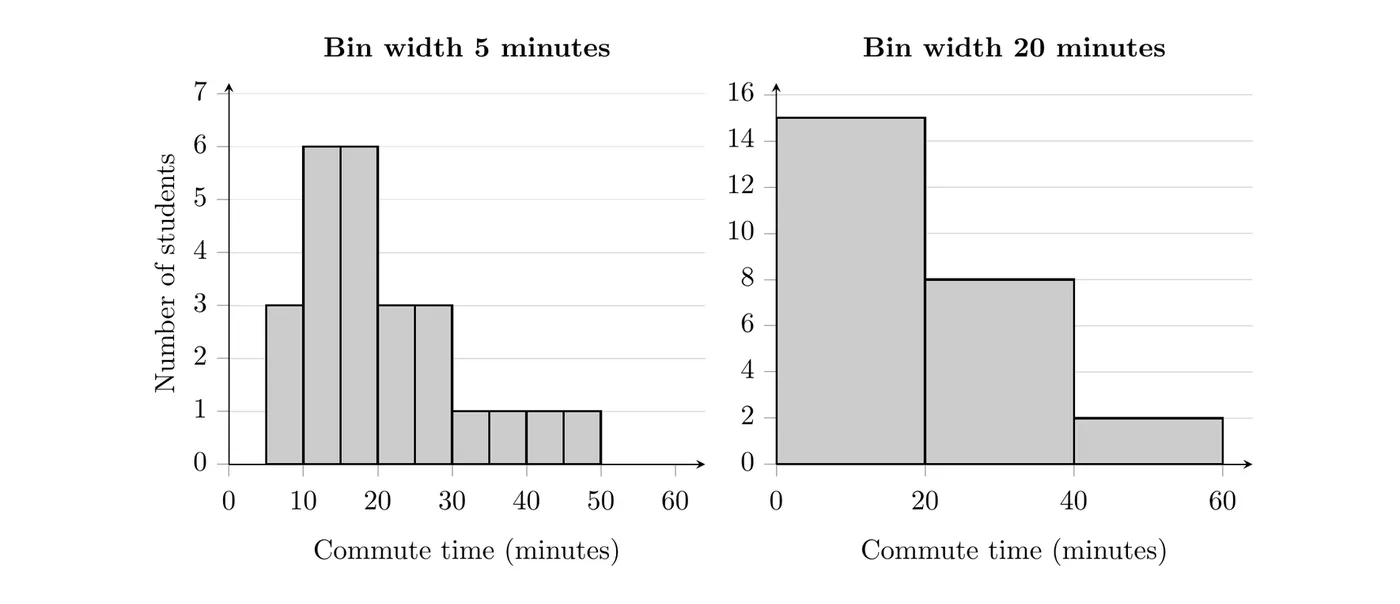
With 5-minute bins, you can see that most commutes bunch up between 10 and 20 minutes, with a few long commutes spread out to the right. With 20-minute bins there are only three bars, and that detail disappears. Neither graph is wrong, but very wide bins hide the pattern, and very narrow bins can make the graph look choppy. Pick a width that shows the overall pattern clearly.
Horizontal histograms
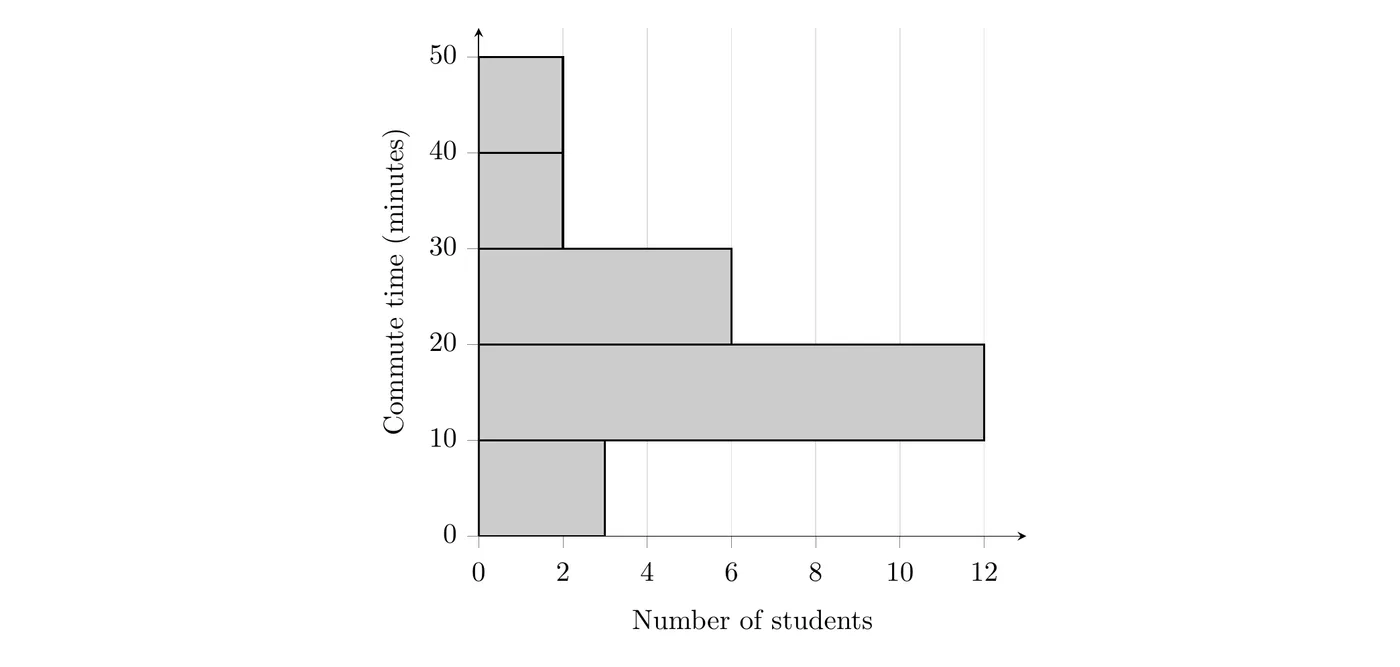
A histogram can also be drawn with the bins on the vertical axis and the bars going sideways. It shows exactly the same information. Here are the 10-minute bins again:
Example 3: Reading a histogram (AP-style)
Fifty students recorded how many hours they slept on the last school night. The relative frequency histogram uses bins of 4 to under 5 hours, 5 to under 6 hours, and so on.
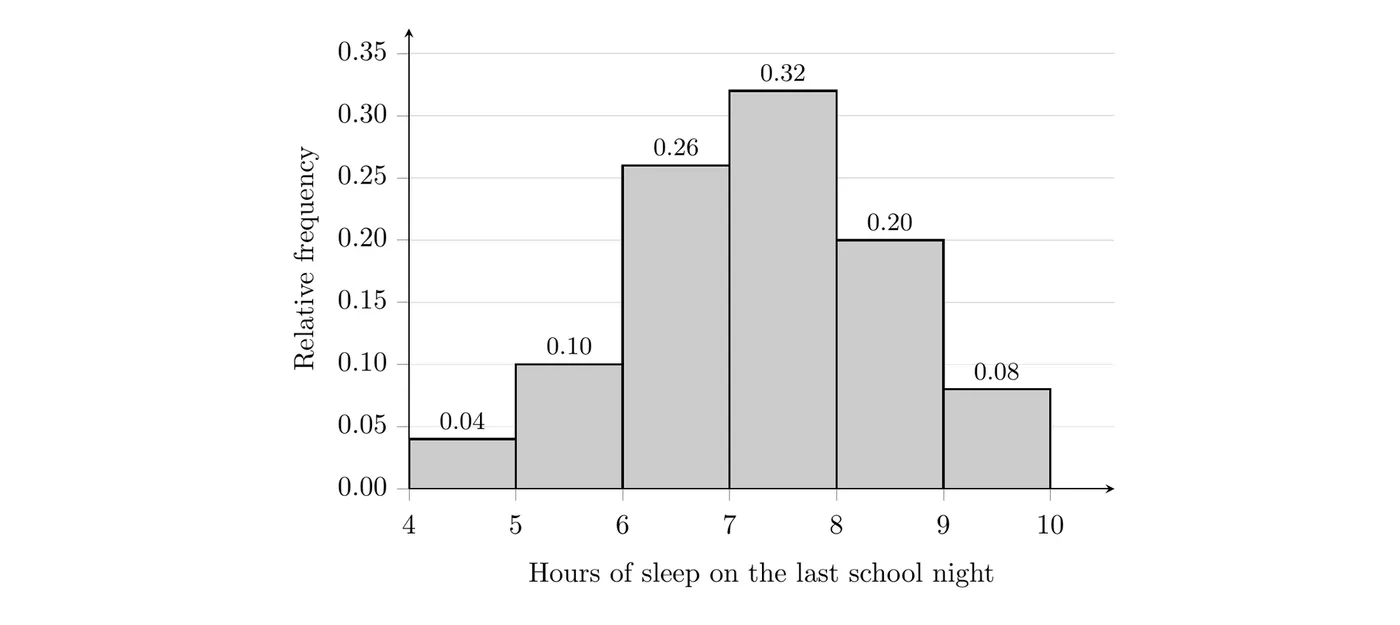
(a) How many of the students slept fewer than 6 hours?
(b) What proportion of the students slept at least 7 hours?
(c) A student claims, "Most students in this group slept less than 7 hours." Do the data support this claim?
(d) Can you tell from the histogram how many students slept exactly 7.5 hours? Explain.
Solution
(a) Fewer than 6 hours means the first two bins. Add their relative frequencies and multiply by the total:
So 7 of the 50 students slept fewer than 6 hours.
(b) At least 7 hours means the 7 to under 8, 8 to under 9, and 9 to under 10 bins:
So 0.60, or 60%, of these students slept at least 7 hours.
(c) No. The proportion who slept less than 7 hours is
which is less than half. Only 40% of these 50 students slept less than 7 hours, while 60% slept at least 7 hours.
(d) No. A histogram only shows how many values fall in each bin. The 7 to under 8 bin holds 0.32 of the students, but the graph doesn't say where in that bin each value is. You'd need the raw data, a dotplot, or a stemplot to find exact values.
Choosing a display
Dotplots and stemplots keep every exact value, so they work well for small data sets, but they get crowded when there are many values. A histogram shows only the count in each bin, and it stays readable for large data sets.
Histogram or bar chart?
They look alike, but they're for different kinds of variables.
Bar chart | Histogram | |
Type of variable | Categorical | Quantitative |
Horizontal axis | Category names | A number line split into bins |
Gaps between bars? | Yes | No, unless a bin is empty |
Order of the bars | Any order | Must follow the number line |
Common mistakes
- Leaving gaps between histogram bars, or skipping an empty bin instead of leaving its space.
- Using bins of different widths, which makes some bars look bigger than they should.
- Putting a boundary value in the wrong bin. A value of 20 goes in 20 to under 30, not 10 to under 20.
- Forgetting the stemplot key, leaving out stems with no leaves, or not putting the leaves in order.
- Reading exact values off a histogram. You can only tell how many values are in each bin.
- Leaving off axis labels and units. Every graph names the variable and its units, like "Commute time (minutes)."