

8.4 - Finding the Area Between Curves Expressed as Functions of x
The Fundamental Concept
To find the area between two curves, subtract the lower function from the upper one and integrate:
where is the upper function, is the lower one, and is the interval.
Critical requirement: this only works where throughout. If the curves cross inside your interval, you need separate integrals.
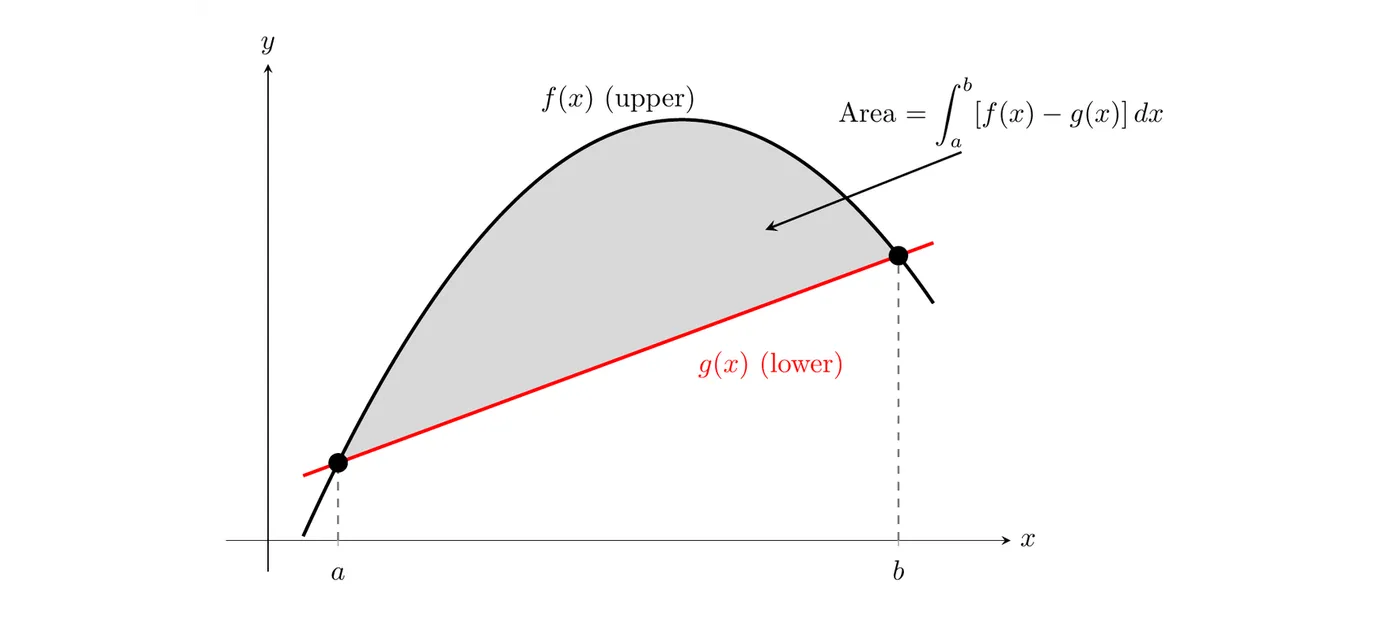
Conceptual understanding: if you found the area under and subtracted the area under , you’d be left with exactly the area between them.
Example 1: Given Boundaries
Problem: Find the area bounded by , , , and .
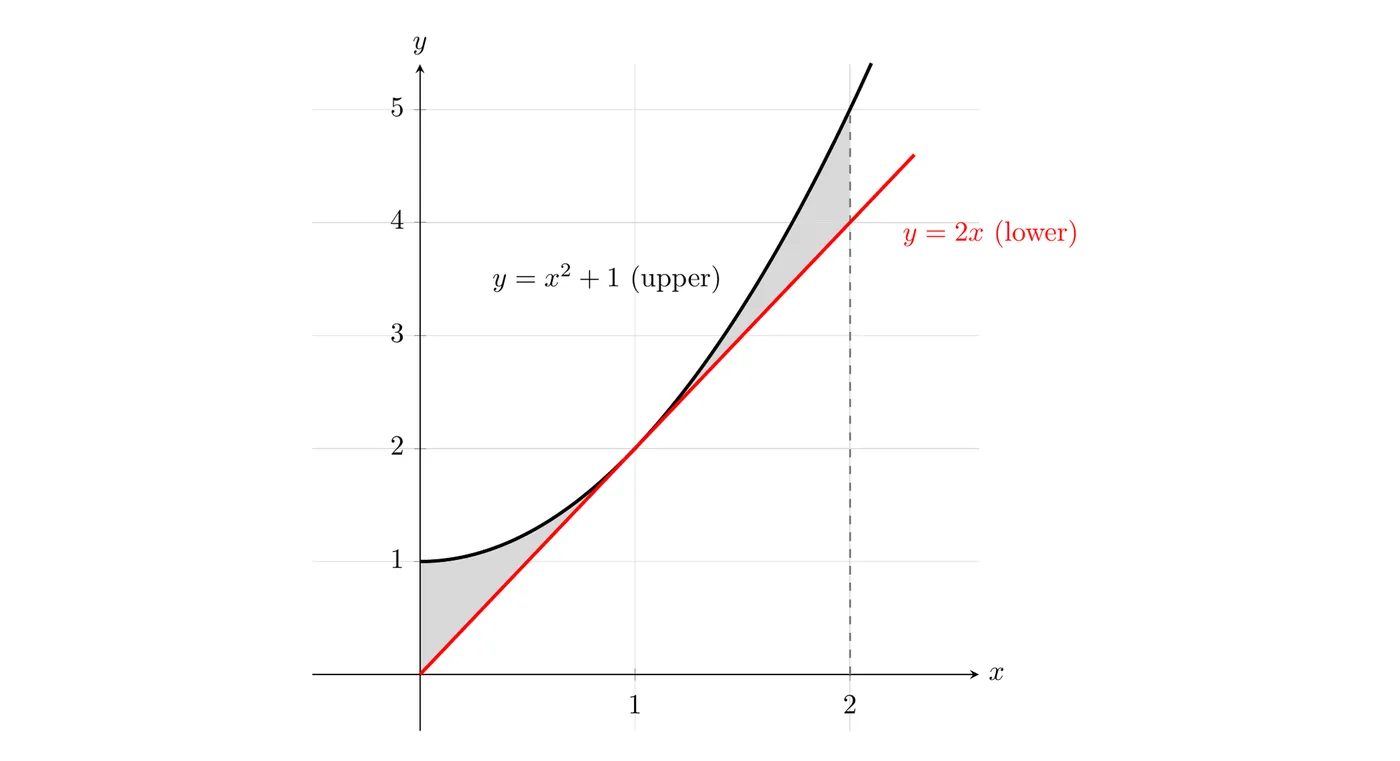
Step 1: Which function is on top? Test :
- Parabola:
- Line:
So is on top. (They actually touch at , but the parabola never dips below.)
Step 2: Set up.
Step 3: Integrate and evaluate.
Area: square units
Example 2: Finding Intersection Points
Problem: Find the area bounded by and .
Step 1: Find where they intersect.
Step 2: Which is on top? Test :
- Parabola:
- Line:
The parabola is on top.
Step 3: Set up and evaluate.
At :
At :
Area: square units
When Boundaries Change: Multiple Integrals
Sometimes the upper or lower boundary switches partway through the region. When it does, you have to split the integral at the switch point.
Example 3: Changing Lower Boundary
Problem: Set up (but don’t evaluate) an integral for the area bounded by above, with the lower boundary being from to and from onward.
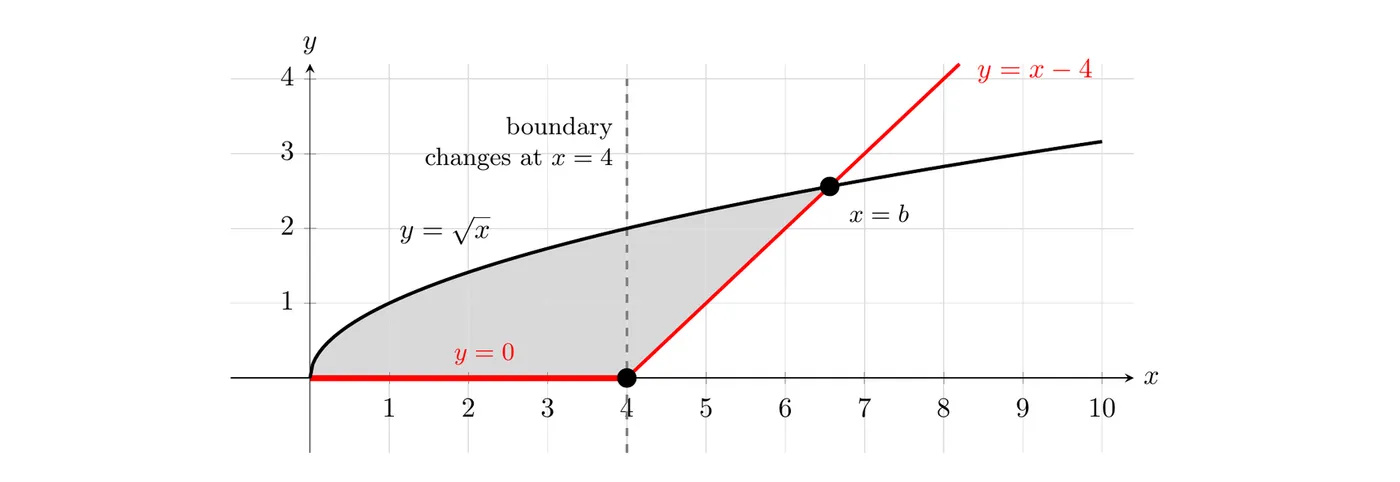
Upper boundary: the whole way, never changes.
Lower boundary:
- From to :
- From on:
Because the lower boundary changes at , you need two integrals:
where is wherever the region ends on the right.
Strategy: track both the top and the bottom boundary. Anywhere either one changes, start a new integral.
Using a Calculator to Find Intersections
When the intersection points are ugly to find by hand, use the graphing calculator.
Example 4: Calculator-Based Problem
Problem: Find the area between and .
Step 1: Graph both.
- Press
Y=
- Enter
Y1 = ln(X)
- Enter
Y2 = (1/3)X - 1
- Press
ZOOM→6:ZStandard
Step 2: Find the intersections.
- Press
2nd→TRACE(CALC)
- Select
5:intersect
- For “First curve?” press
ENTER
- For “Second curve?” press
ENTER
- For “Guess?” move the cursor near the left intersection and press
ENTER
Result:
Step 3: Store it.
- Press
2nd→MODE(QUIT)
- Press
STO→
- Press
ALPHA→A
- Press
ENTER
This stores the full precision value, not just what’s displayed.
Step 4: Repeat for the second intersection. Result: . Store it as
B.Step 5: Compute the area with the stored values.
- Press
MATH→9:fnInt(
- Enter
fnInt(Y1 - Y2, X, A, B) - Get
Y1andY2fromVARS→Y-VARS→1:Function - Get
AandBwithALPHAthen the letter
- Press
ENTER
Result: area square units
Why store the values? If you round to 0.42 and to 9.87, you introduce rounding error. Storing keeps full precision.
Finding a Line That Divides a Region
A classic AP problem: find the vertical line that splits a region into two equal areas.
Example 5: Equal Division
Problem: The region bounded by and (which meet at and ) is divided into two equal areas by the line . Find .
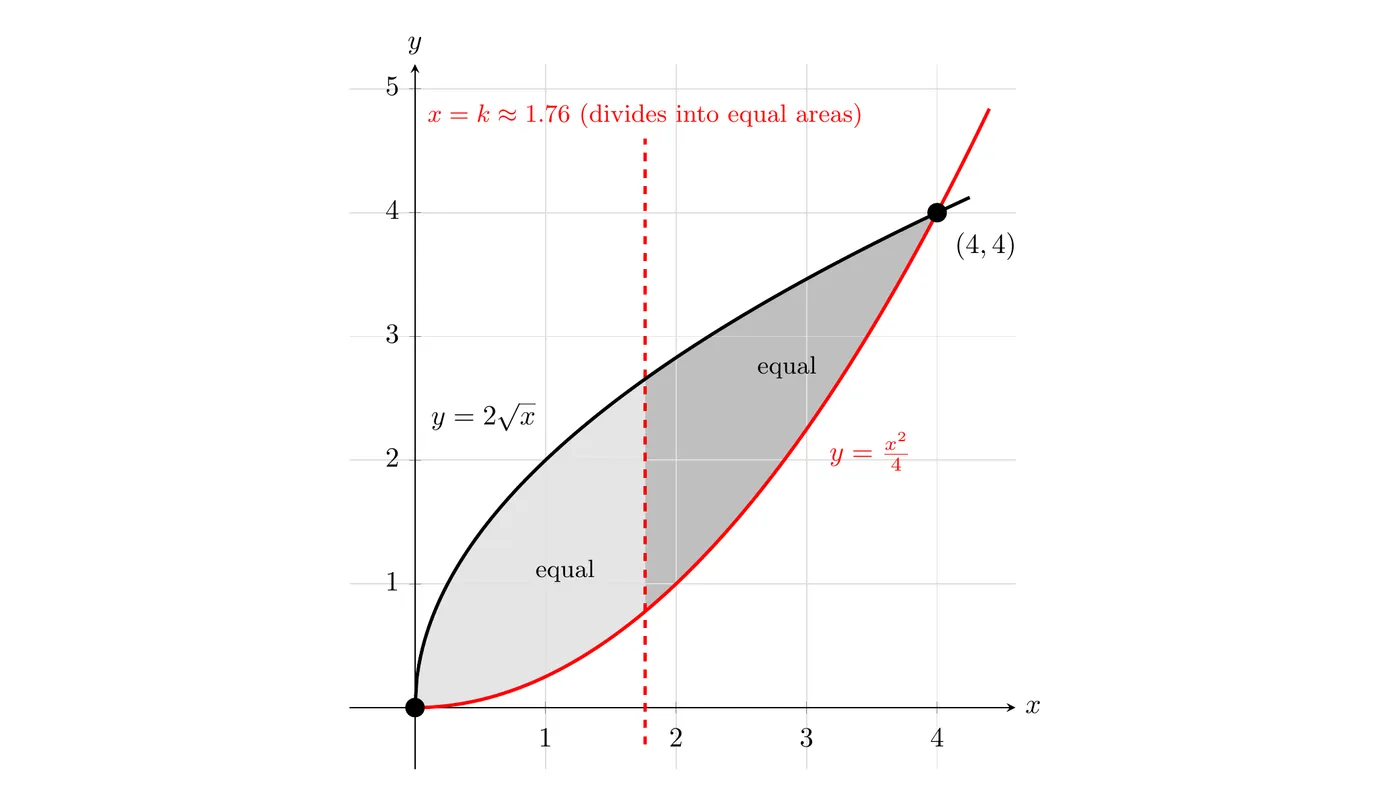
Strategy: set the area from 0 to equal to the area from to 4.
Step 1: Set up.
Step 2: Antiderivative.
Step 3: Evaluate both sides.
Left side:
Right side: , where
Step 4: Set equal and simplify.
Move everything with to the left:
Step 5: Solve with a calculator.
Graph both sides:
Y1 = (8X^(3/2))/3 - X^3/6
Y2 = 16/3
Find the intersection with
2nd → CALC → 5:intersect.Result:
Answer: the line divides the region into two equal areas.
Problem-Solving Strategy
Step 1: Identify the functions and boundaries. What are the curves? What are the x-limits?
Step 2: Find intersection points if you need them. Set the functions equal, or use
2nd → CALC → intersect.Step 3: Figure out which function is on top. Plug a test value from the interval into both. The bigger output wins.
Step 4: Check whether the boundaries change. If the top curve changes, split there. If the bottom curve changes, split there.
Step 5: Set up the integral(s).
Step 6: Evaluate. By hand, or with
MATH → 9:fnInt(.Calculator Workflow for Complex Problems
Store intersection points:
- Find the intersection:
2nd CALC→5
- Right after, press
2nd MODE(QUIT)
- Store:
STO→→ALPHA→ letter →ENTER
Use the stored values in the integral:
MATH→9
- Enter
fnInt(Y1 - Y2, X, A, B)
- Get Y-variables from
VARS→Y-VARS→Function
- Get stored letters with
ALPHA
Why it matters: full precision (no rounding error), speed (no retyping), and accuracy, especially when the boundaries are irrational.
Key Takeaways
- Area between curves:
- Figure out which is on top by plugging in a test value
- Find intersections by setting the functions equal, or use the calculator
- Split into multiple integrals whenever the top or bottom function changes
- Store calculator values with
STO→to keep precision
- Multiple integrals just get added together
- For equal-division problems, set two integrals equal and solve for
- Calculator integration:
MATH→9→fnInt(function, X, lower, upper)
- Store functions in
Y=and reference them asY1,Y2, etc.
- Always sanity-check your answer against the graph