

8.6 - Finding the Area Between Curves That Intersect at More Than Two Points
The Challenge
When two curves intersect more than twice, they carve out multiple bounded regions. Each region needs its own integral, because the functions switch positions (whichever one is on top changes).
Key principle: at each intersection point, figure out which function is on top for that region, then set up a separate integral.
Example 1: Three Intersection Points
Find the area between and .
Step 1: set the functions equal
Step 2: move everything to one side. The terms cancel:
Step 3: factor
Step 4: solve with the zero product property
Intersection points: . Label them , , .
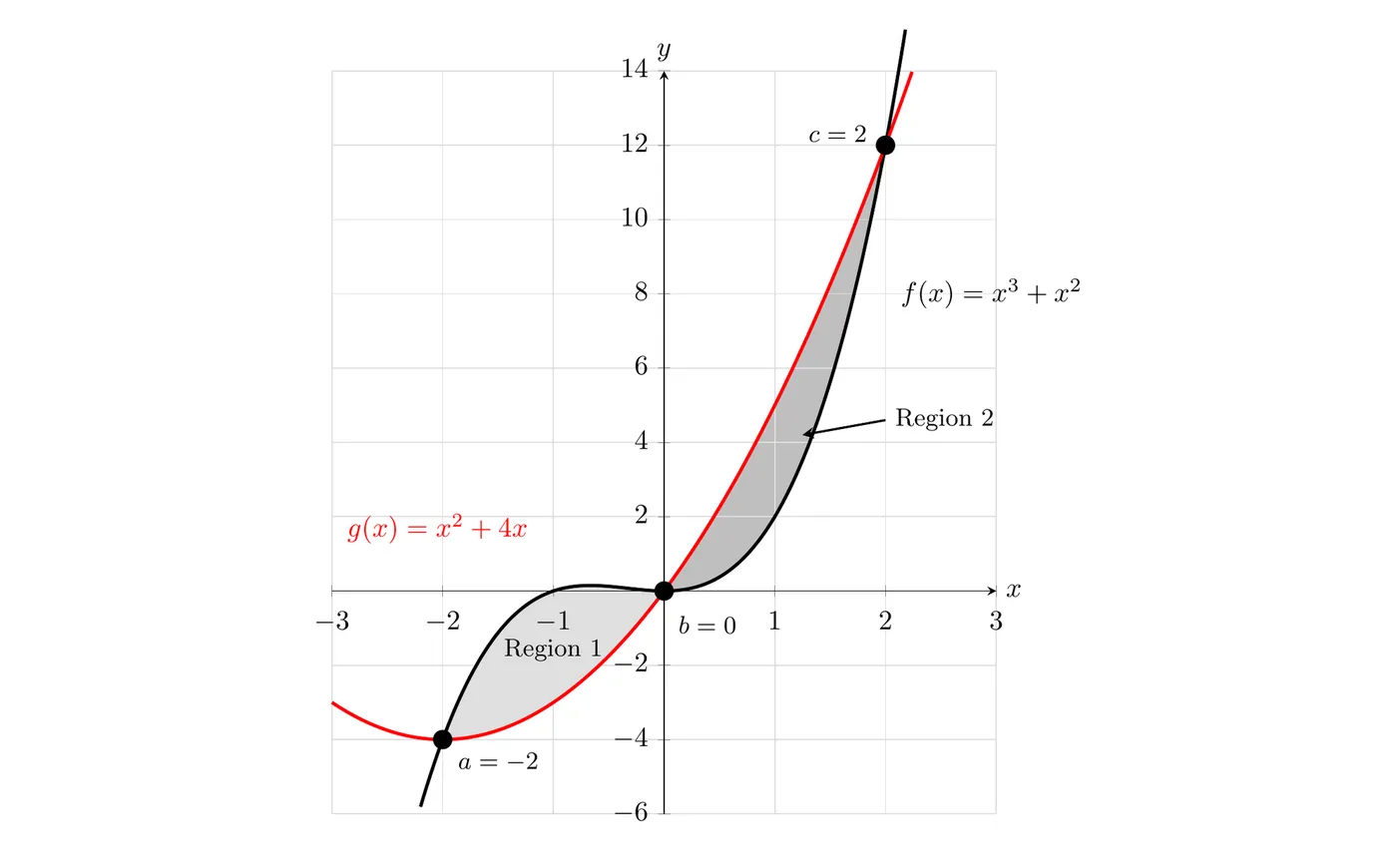
Setting Up the Integrals
Three intersection points create two regions, so we need two integrals.
Step 1: which function is on top in each region?
Region 1 ( to ). Test :
- Cubic:
- Parabola:
Since , the cubic is on top.
Region 2 ( to ). Test :
- Cubic:
- Parabola:
Since , the parabola is on top.
Step 2: set up an integral for each region
Notice that the cubic comes first in the first integral (it’s on top) and the parabola comes first in the second one. The subtraction order flips.
Step 3: simplify (optional)
Step 4: evaluate
Total area: square units
Calculator Shortcut: The Absolute Value Method
On a calculator, you can do the whole thing with one integral:
where is the leftmost intersection and is the rightmost. The absolute value automatically makes every region positive, no matter which function is on top.
Warning:
The absolute value has to be inside the integral.
- Correct:
- Wrong:
- In Example 1, the wrong version gives , because the two regions cancel. The true area is 8.
When to use it: calculator-active questions where you just need a number quickly.
When not to: no-calculator questions, where you have to evaluate each piece by hand anyway. On free response, is a correct setup, but writing the separate integrals shows which function is on top in each region.
Example 2: Three Regions
Find the area bounded by , , from to .
Step 1: find the intersections
So the curves cross at .
Boundaries: , , , .
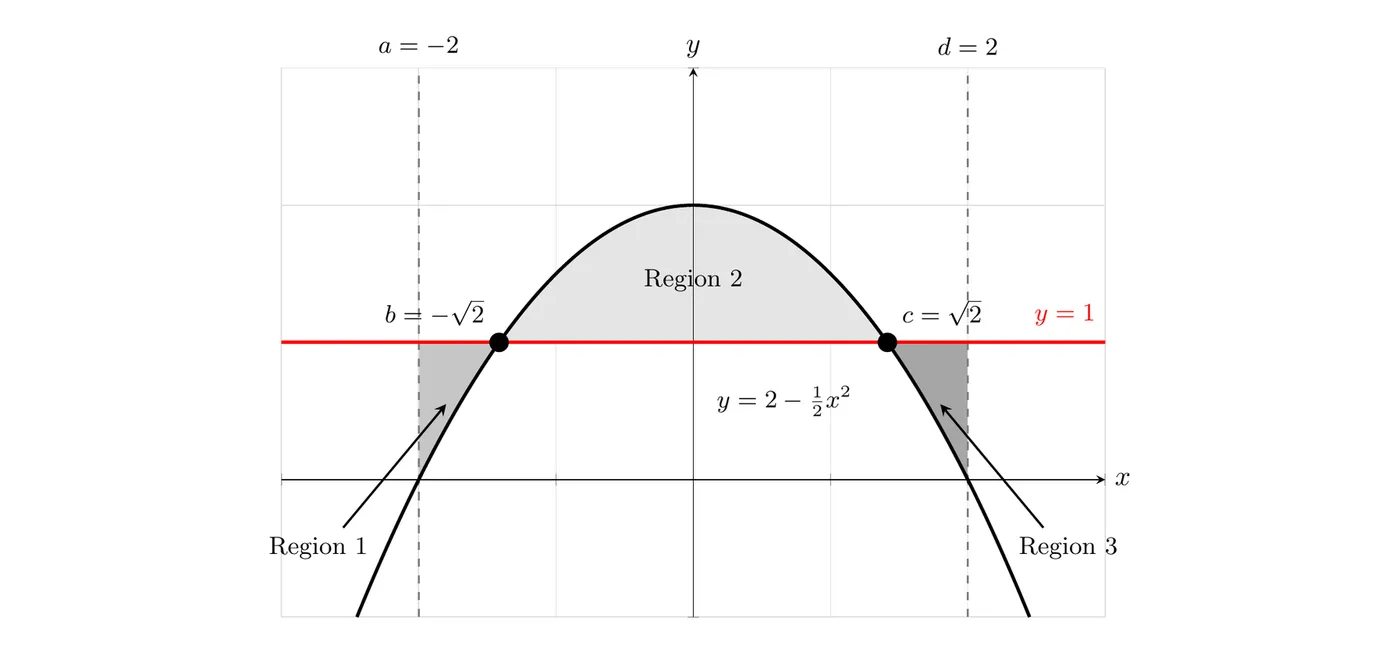
Step 2: which function is on top in each region?
Region 1 (). Test :
- Line:
- Parabola:
Line is on top.
Region 2 (). Test :
- Line:
- Parabola:
Parabola is on top.
Region 3 (). Test :
- Line:
- Parabola:
Line is on top.
Step 3: three integrals
Simplified:
Regions 1 and 3 have the same integrand, because the same function is on top in both. That’s symmetry doing you a favor.
Storing Intersection Points on a Calculator
When the intersections are irrational or ugly decimals, store them so you don’t lose precision.
Step 1: find the intersections
1. Enter both functions in Y=
2. Press GRAPH
3. 2nd → CALC → 5:intersect
4. Select the first curve, second curve, then make a guess
5. Note the -value
Step 2: store it
1. 2nd → MODE (QUIT)
2. Press STO→
3. Press ALPHA → A (or any letter)
4. Press ENTER
Step 3: repeat, storing the other intersections as B, C, and so on.
Step 4: use the stored variables in your integrals:
Then evaluate with MATH → 9:fnInt( using A, B, C.
General Strategy
Step 1: find ALL intersection points. Set the functions equal, solve algebraically or with a calculator, and list them in order:
Step 2: count the regions. Number of regions = (number of boundaries) − 1. The boundaries are all the intersections, plus any other endpoints the problem gives you. Each region needs its own integral.
Step 3: for each region, pick a test point inside the interval, evaluate both functions there, and whichever is larger is the “top” function.
Step 4: set up one integral per region, each of the form
Step 5: add them all together.
Example 3: Setup Only
Set up (but don’t evaluate) integrals for the area between and from to .
Step 1: find the intersections
Step 2: test each region
From to , test :
-
-
is on top.
From to , test :
-
-
is on top.
Step 3: write the integrals
Common Mistakes to Avoid
- Forgetting to find all intersection points. Solve completely, and check whether the functions cross more than twice
- Using the same integrand for every region. Check which function is on top in EACH region separately
- Putting the absolute value outside the integral. It goes inside: , not
- Not using parentheses when subtracting. Write , not
- Forgetting to add all the integrals together
When the Intersections Aren’t Nice Values
Non-calculator problems: leave answers in exact form. Write , not , and simplify radicals where you can.
Calculator problems: store values with STO→, reference the stored variables in your integrals, and you keep full precision.
Summary Table
Boundaries | Regions Created | Integrals Needed |
2 | 1 | 1 |
3 | 2 | 2 |
4 | 3 | 3 |
Key Takeaways
- Multiple intersections create multiple regions, and each needs its own integral
- Find all intersections: set the functions equal and solve completely
- Test each region. Don’t assume the same function stays on top
- One integral per region: number of integrals = (boundaries) − 1, where the boundaries are the intersections plus any other given endpoints
- Add the areas together for the total
- Calculator shortcut: works, but doesn’t show full work
- Absolute value placement: inside the integral, not outside
- Store intersection values on your calculator for precision with decimals
- Order matters: always subtract bottom from top (or left from right for )
- Sketch a rough graph to see which function is where
- Parentheses are essential when subtracting multi-term functions