

1.4 - Estimating Limit Values from Tables
Limits Through Numerical Analysis
We’ve done limits graphically. Now we’ll find them by looking at numbers in a table. This helps us estimate limits when we can evaluate the function at points very close to (but not equal to) the value we’re approaching.
Recall that when we write:
it means that as approaches 3 from both sides, the -values approach 4.
Tables of Values
We can approximate limits by evaluating a function at -values that get closer and closer to our target.
Example: basic table analysis
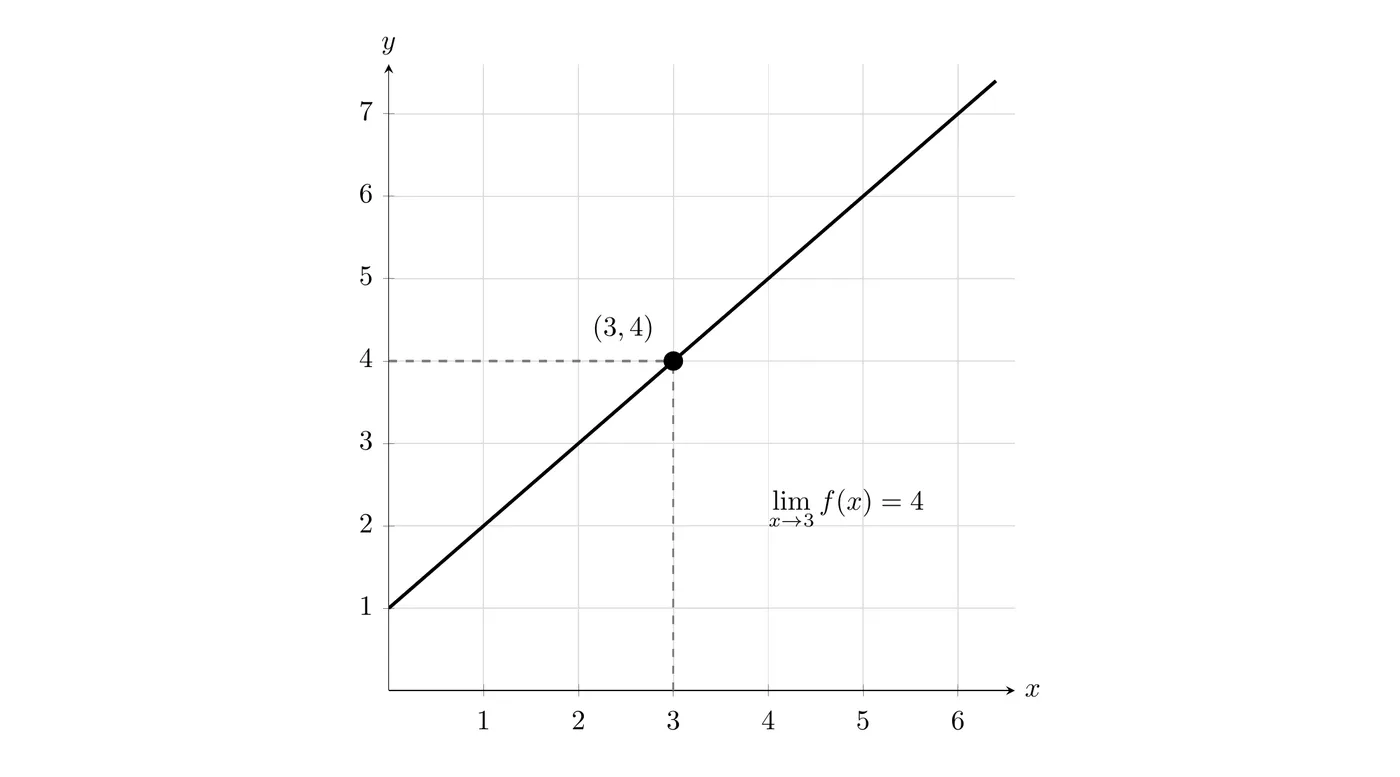
For the graph above, we could build this table:
2.9 | 3.9 |
2.99 | 3.99 |
2.999 | 3.999 |
3 | ? |
3.001 | 4.001 |
3.01 | 4.01 |
3.1 | 4.1 |
As gets closer to 3 from both sides, approaches 4. So:
Example: Reading from a Table
Given this table, find :
-4.1 | 2.1 |
-4.01 | 2.01 |
-4.001 | 2.001 |
-4 | undefined |
-3.999 | 1.999 |
-3.99 | 1.99 |
-3.9 | 1.9 |
Looking at values approaching from both sides:
- From the left, values approach 2
- From the right, values approach 2
Even though is undefined, the limit still exists because both one-sided approaches agree.
Using a Graphing Calculator
Method 1: table feature
For complicated functions, calculating values by hand gets tedious. Calculators can build tables fast.
Example function:
Find .
Calculator steps (TI-84 family):
- Press
Y=and enter the function
- Press
2ndthenTBLSET(aboveWINDOW)
- Change “Indpnt:” from “Auto” to “Ask”
- Press
2ndthenTABLE(aboveGRAPH)
- Enter -values close to :
- (this will show ERROR)
The table shows the corresponding -values.
Limitation: table columns are narrow, so long decimals get rounded or cut off automatically.
Method 2: function notation (more accurate)
This gives more decimal precision.
- Enter your function in
Y1
- Press
2ndthenQUITto get back to the home screen
- Press
VARS, move toY-VARS, selectFunction, chooseY1
- Add parentheses and your -value:
Y1(-2.1)
- Press
ENTER
Time saver: press
2nd then ENTRY to recall the previous calculation and just edit the -value.Y1(-2.1) → 0.9 Y1(-2.01) → 0.99 Y1(-2.001) → 0.999 Y1(-2) → ERROR: Divide by 0 Y1(-1.999) → 1.001 Y1(-1.99) → 1.01 Y1(-1.9) → 1.1
The values approach 1 from both sides, so:
Working with Compositions
Sometimes we need limits of composite functions.
Example
Given that is continuous and increasing for all , and this table:
1.9 | 4.2 |
1.95 | 4.5 |
1.99 | 4.8 |
2 | ? |
2.01 | 5.2 |
2.05 | 5.5 |
2.1 | 5.8 |
Find .
Step 1: find
From the table, as , the values of approach about 5.
The “continuous and increasing” statement guarantees there are no surprise dips or jumps between the table values.
Step 2: evaluate the outer function
Step 3: calculate
Make sure your calculator is in RADIAN mode, not degrees. To check, press
MODE and confirm “RADIAN” is highlighted.AP Calculus Decimal Precision Rule
All numerical answers must be accurate to three decimal places. You have two options.
Option 1: rounding
Round to three decimals using standard rules.
For , the fourth decimal is 9, and , so round up. Answer: .
Option 2: truncating
Just write the first three decimals and stop.
For , take only the first three decimals. Answer: .
Both are acceptable on the AP exam.
Common calculator answer formats
For a result like :
Acceptable:
- (rounded)
- (truncated)
- (extra decimals are fine, graders only check the first three)
Not acceptable:
- (only two decimals)
- (only one decimal)
AP graders are trained to look at only the first three decimal places. Writing more decimals does nothing for you, since anything past the third is ignored.
Practice Problems
Problem 1
Use the table to find :
4.9 | 7.9 |
4.99 | 7.99 |
4.999 | 7.999 |
5.001 | 8.001 |
5.01 | 8.01 |
5.1 | 8.1 |
Answer:
Problem 2
Given , use your calculator to estimate .
Suggested -values: 3.9, 3.99, 3.999, 4.001, 4.01, 4.1
3.9 | 7.9 |
3.99 | 7.99 |
3.999 | 7.999 |
4.001 | 8.001 |
4.01 | 8.01 |
4.1 | 8.1 |
Answer: , since values approach 8 from both sides.
Problem 3
The table shows values for a continuous function :
0.9 | 2.1 |
0.95 | 2.3 |
0.99 | 2.7 |
1.01 | 3.3 |
1.05 | 3.7 |
1.1 | 3.9 |
Find to three decimal places.
From the table, (values approach 3 from both sides). So:
Answer: (rounded) or (truncated)
Key Takeaways
- Tables give numerical evidence for limit values
- Choose -values progressively closer to your target from both sides
- The calculator table feature is convenient but can lack precision
- The function notation method (
Y1(value)) gives more accurate decimals
- Always use RADIAN mode for trig functions in calculus
- Three decimal places are required for all numerical answers
- Statements like “continuous and increasing” guarantee no hidden behavior between table values
- Limits can exist even when the function is undefined at that point
- For composite functions, work from the inside out